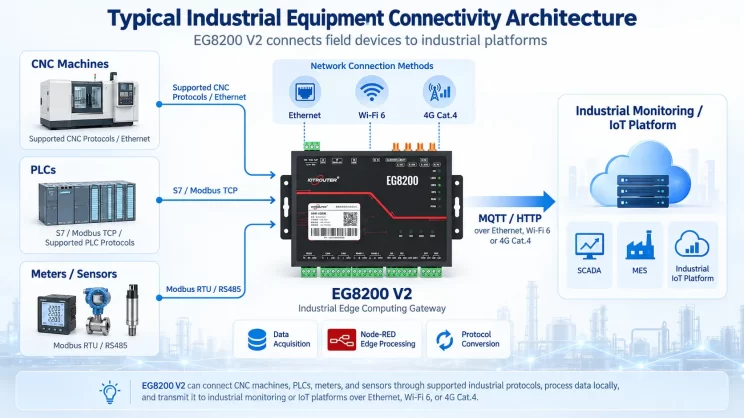
Neste tutorial, vamos centrar-nos na integração do HAAS CNC com o CNC Gateway. Esperamos que isto seja útil.
Nas aulas anteriores, abordámos:
Como o EG8200 Mini CNC Gateway se liga aos sistemas CNC da Siemens
Como integrar o CNC Gateway com o CNC da Mitsubishi
Como integrar o CNC Gateway com a nova geração de CNC
Esta lição irá fornecer uma explicação detalhada sobre os sistemas CNC da Haas. O CNC da Haas utiliza dois modos de comunicação: Ethernet e porta série. A seguir, abordaremos a integração do gateway CNC para ambos os modos.
1. Haas CNC (Ethernet) – Integração do gateway CNC
1. Ligação do hardware
O CNC da Haas comunica-se através de Ethernet. Certifique-se de que o endereço IP da porta LAN do gateway e o endereço IP do CNC da Haas estão na mesma sub-rede (Nota: em casos especiais, podem estar em sub-redes diferentes, o que requer uma configuração de encaminhamento — consulte o apoio técnico para obter mais detalhes). Neste exemplo, os endereços IP são atribuídos da seguinte forma:
|
EG8200 Mini-CNC gateway |
Haas CNC (Ethernet) |
|
| Endereço IP | 192.168.88.1 | 192.168.88.34 |
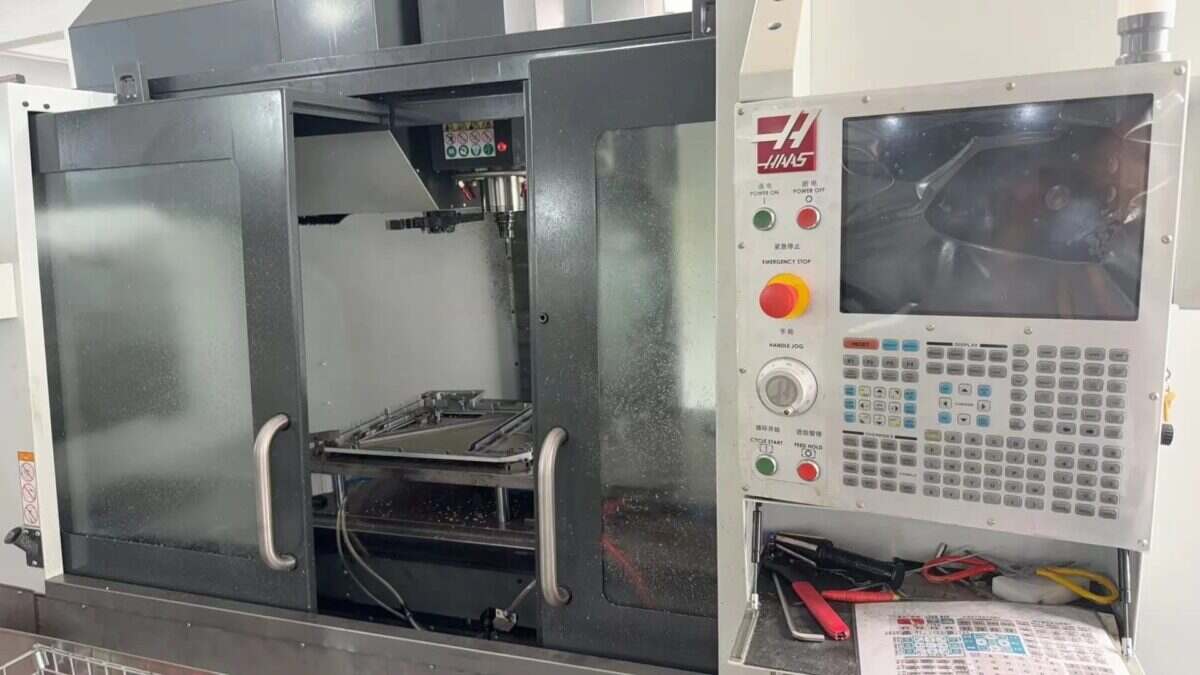
2. Configuração da máquina-ferramenta
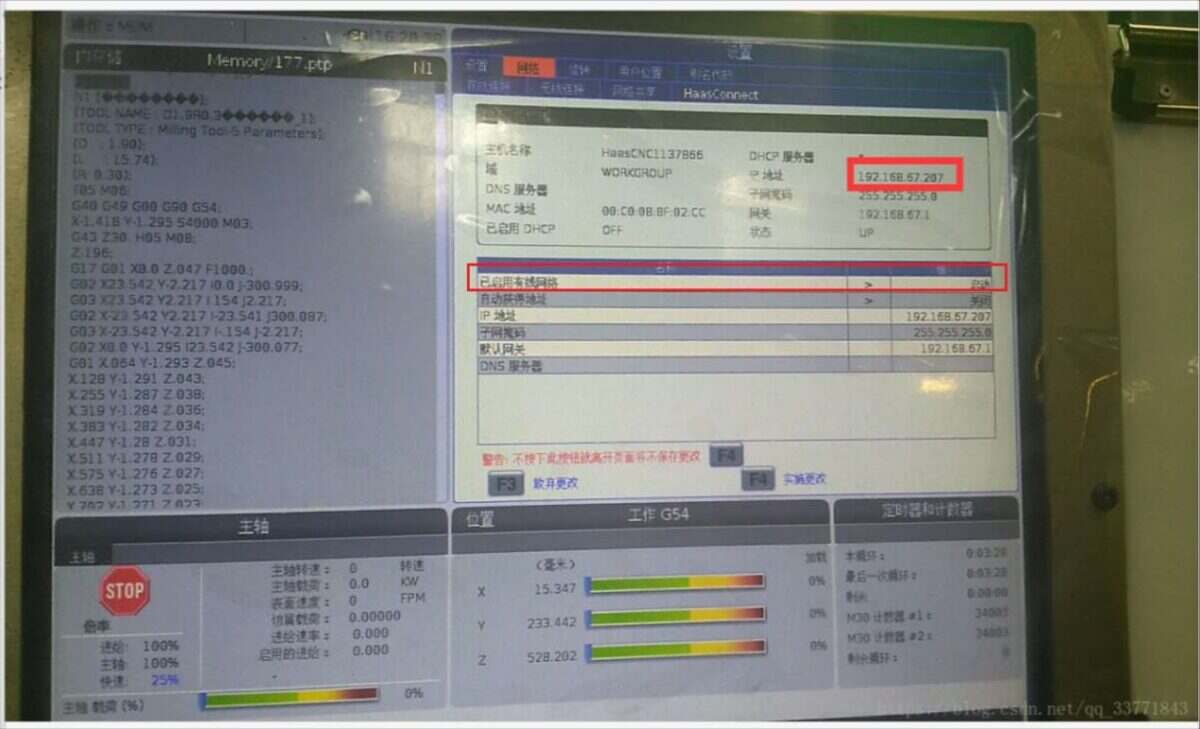
2.1. Localizar ou configurar o endereço IP no sistema Haas
Localize a interface apresentada abaixo e certifique-se de que o estado da rede com fios está ativado no arranque:
2.2. Definição do número da porta
Aceda à interface «Definições» (à esquerda do botão «Opções de rede»), selecione o separador «Outros» e introduza a interface correspondente:
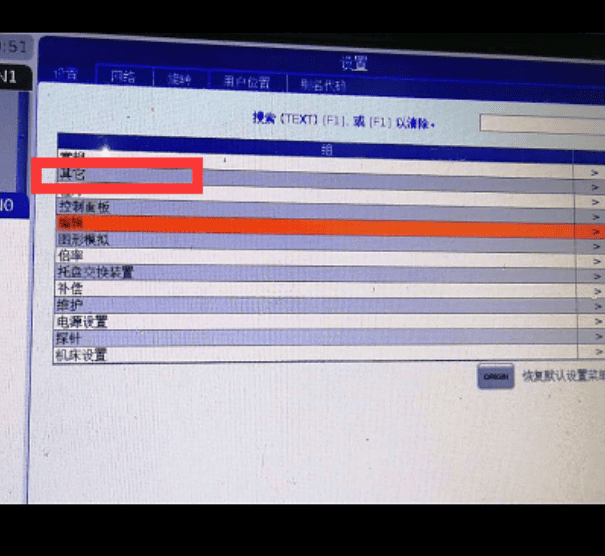
Configure o parâmetro 143 e defina o número da porta:
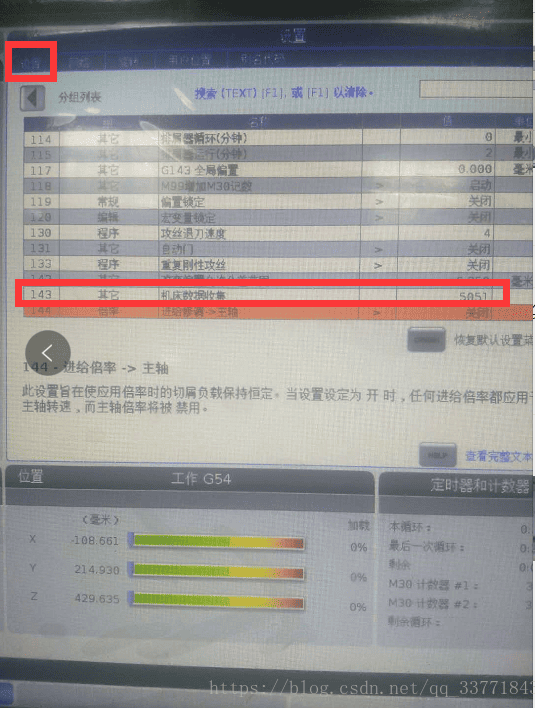
A configuração lateral da máquina-ferramenta está concluída. Reinicie o CNC.
3. Configuração da porta de entrada
3.1. Configurações de ligação do CNC
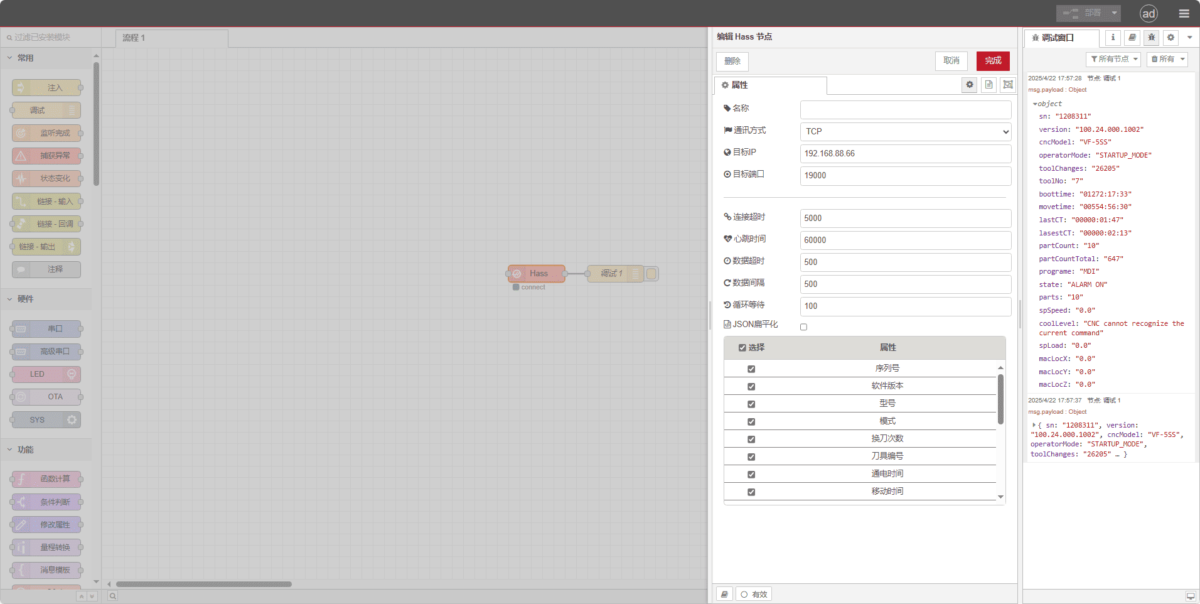
Arraste um nó Hass do painel esquerdo, clique duas vezes para abrir a página de definições e configure da seguinte forma, com base nos parâmetros do PLC:
Método de comunicação: TCP
IP de destino: 192.168.88.66 (Substitua por o endereço IP da sua máquina-ferramenta)
Porto: 19000 (Introduza a porta configurada na máquina-ferramenta)
Tempo limite de ligação: 5000
Intervalo entre batimentos cardíacos: 60000
Tempo limite de dados: 500
Intervalo de dados: 500
Tempo de espera do ciclo: 100
3.2. Testes
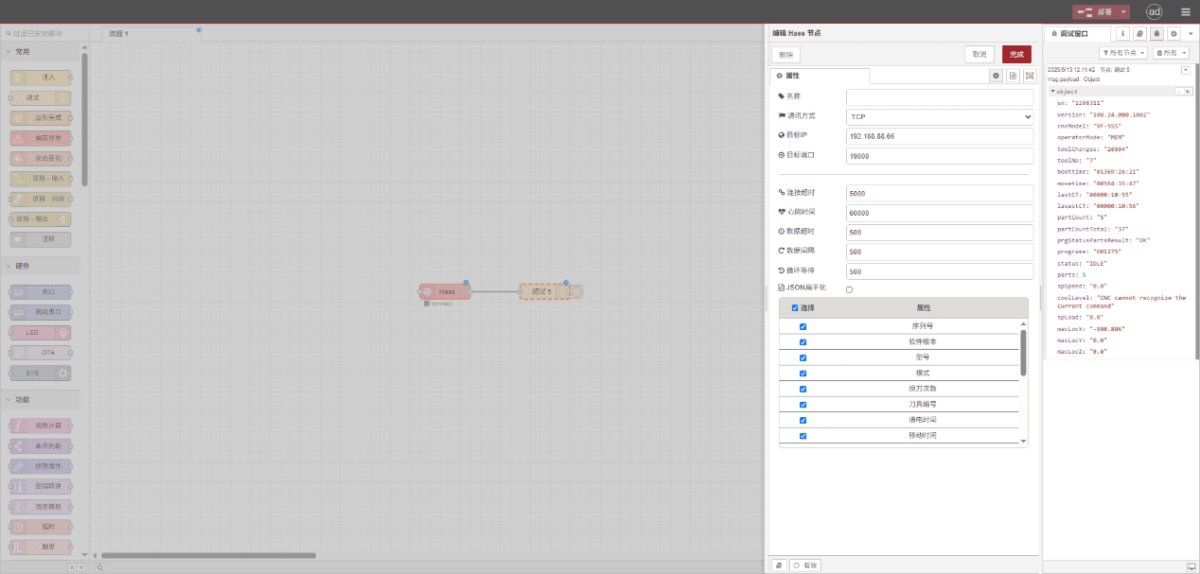
Clique em «Implementar» e observe que é apresentado um ponto de dados a cada poucos segundos. Verifique os pontos de dados recebidos para confirmar que a comunicação foi bem-sucedida!
Para consultar a tabela de referência dos pontos de dados, consulte:
Esta é uma ficha de conteúdo sobre os Yueque. Clique na ligação para ver: https://iotrouter.yuque.com/zn3vdn/eg8000/inggeg9b79itoggq
2. Haas CNC (porta série) – Integração do gateway CNC
CNC compatível: VS500
1. Ligação do hardware
O CNC Haas utiliza comunicação série. Neste exemplo, a porta de comunicação do CNC é uma interface RS-232 com conector DB-25. Os pinos TXD/RXD/GND devem ser encaminhados para o exterior e ligados à interface RS-232 do gateway. Ligue o TXD ao RX do gateway, o RXD ao TX do gateway e o GND ao GND do gateway.
Configuração padrão de pinos RS-232 do conector DB25 (25 pinos)
| Número PIN | Nome | Direção | Descrição |
|---|---|---|---|
| 1 | PGND | – | Terra de proteção (terra do chassis) |
| 2 | TXD | Saída | Transmitir dados (DTE → DCE) |
| 3 | RXD | Entrada | Receber dados (DCE → DTE) |
| 4 | RTS | Saída | Pedido de envio (DTE → DCE) |
| 5 | CTS | Entrada | Pronto para enviar (DCE → DTE) |
| 6 | DSR | Entrada | Conjunto de dados pronto (DCE → DTE) |
| 7 | GND | – | Terra do sinal (retorno comum) |
| 8 | DCD | Entrada | Detecção de Portador de Dados (DCE → DTE) |
| 20 | DTR | Saída | Pronto para terminal de dados (DTE → DCE) |
| 22 | RI | Entrada | Indicador de anel (DCE → DTE) |
2. Configurações da máquina-ferramenta
2.1. Configuração dos parâmetros da porta série
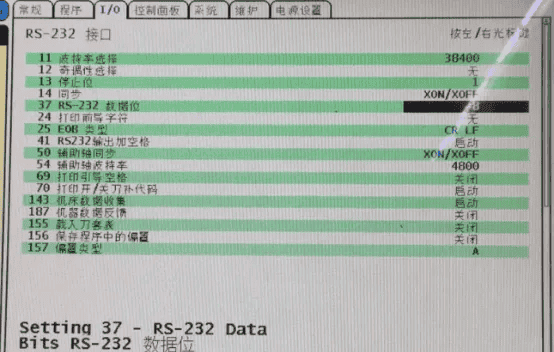
Clique no botão «Definições», selecione «E/S» e altere os parâmetros do sistema.
3. Definições da porta de entrada
3.1. Configurações de ligação do CNC
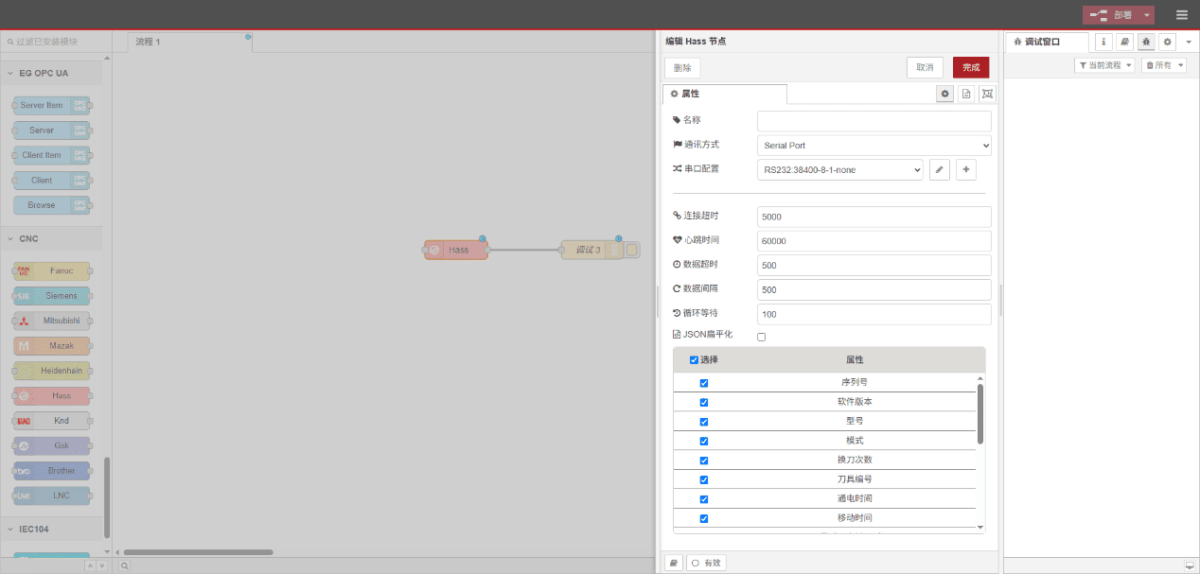
Arraste um nó Hass do painel esquerdo, clique duas vezes para abrir a página de definições e configure da seguinte forma, com base nos parâmetros do PLC:
Método de comunicação: Porta de série
Porta de série: RS232
Taxa de transmissão: 38400
Bits de dados: 8
Bits de paragem: 1
Paridade: Nenhum
Tempo limite de ligação: 5000
Intervalo entre batimentos cardíacos: 60000
Tempo limite de dados: 500
Intervalo de dados: 500
Tempo de espera do ciclo: 100
3.2. Testes
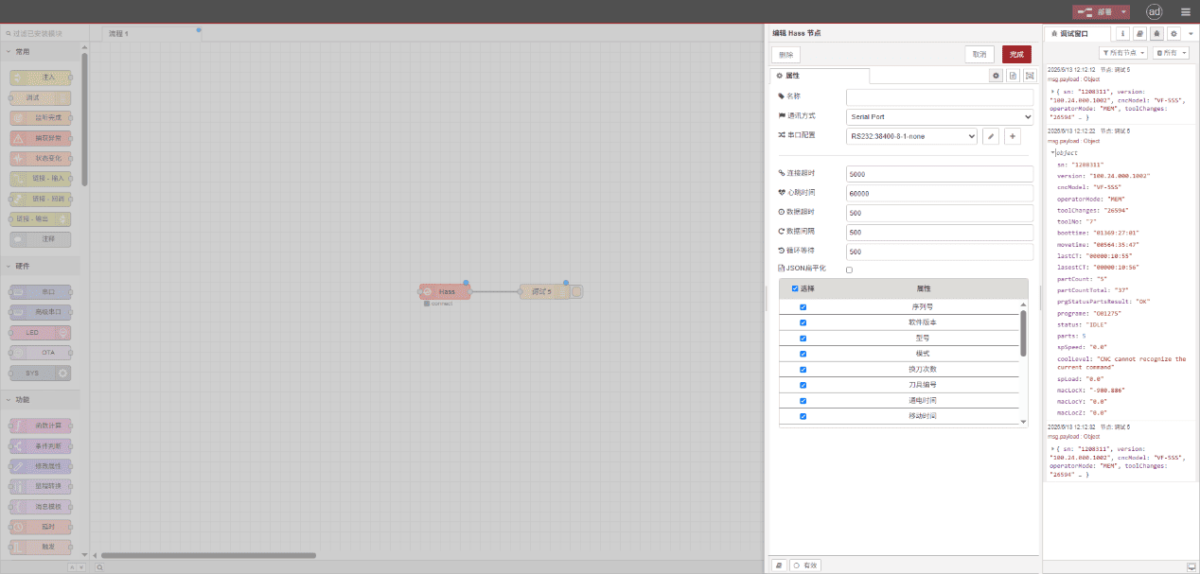
Clique em «Implementar» e observe que é apresentado um ponto de dados a cada poucos segundos. Verifique os pontos de dados recebidos para confirmar que a comunicação foi bem-sucedida!
Para consultar a tabela de referência dos pontos de dados, consulte:
Esta é uma ficha de conteúdo sobre os Yueque. Clique na ligação para ver: https://iotrouter.yuque.com/zn3vdn/eg8000/inggeg9b79itoggq

Agnes Wang é especialista em soluções de IoT na IOTRouter, dedicando-se principalmente a gateways de IoT industrial, computação de ponta e soluções de automação industrial.
É especialista em tecnologias de comunicação industrial, incluindo Modbus, IEC 60870-5-104, MQTT, OPC UA, integração de PLC e aplicações de monitorização remota. Colabora na elaboração de artigos técnicos e guias de aplicação sobre soluções de IoT industrial, conversão de protocolos e computação na periferia.