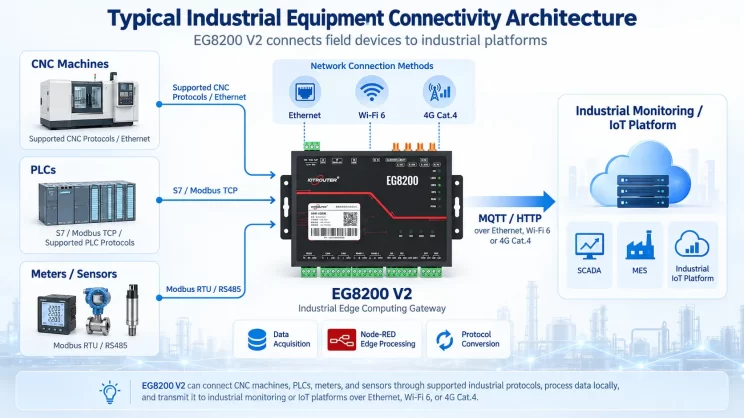
In this tutorial, we will focus on HAAS CNC Integration with CNC gateway. We hope this proves helpful.
In den vorangegangenen Lektionen haben wir uns mit :
Wie das Mini-CNC-Gateway EG8200 mit den CNC-Systemen von Siemens zusammenarbeitet
Einbindung des CNC-Gateways in die Mitsubishi CNC
Integration des CNC-Gateways in die neue CNC-Generation
This lesson will provide a detailed explanation for Haas CNC systems. HAAS CNC employs two communication modes: Ethernet and serial port. Below, we will address CNC gateway integration for both modes.
1.Haas CNC (Ethernet) – CNC Gateway Integration
1. Hardware-Anschluss
The Haas CNC communicates via Ethernet. Ensure the LAN port IP of the gateway and the Haas CNC DE IP are on the same subnet (Note: In special cases, they may be on different subnets, requiring routing configuration—consult technical support for details). IP addresses are assigned as follows in this example:
|
EG8200Mini-CNC-Gateway |
Haas CNC (Ethernet) |
|
| IP-Adresse | 192.168.88.1 | 192.168.88.34 |
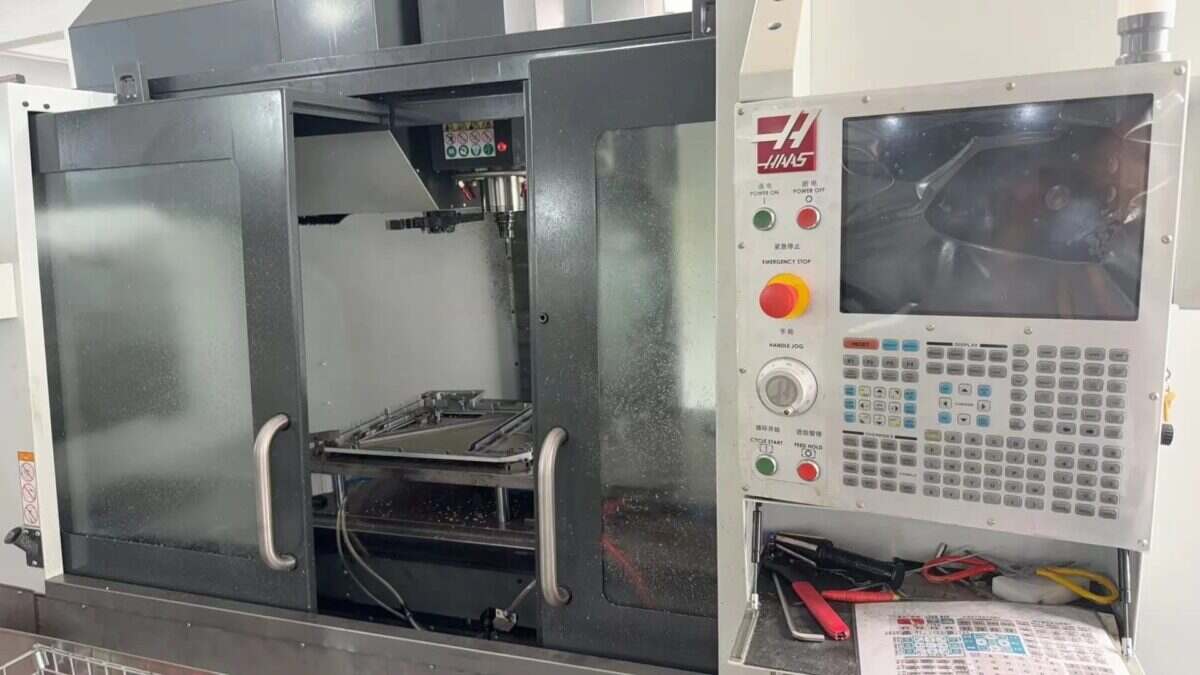
2. Machine Tool Setup
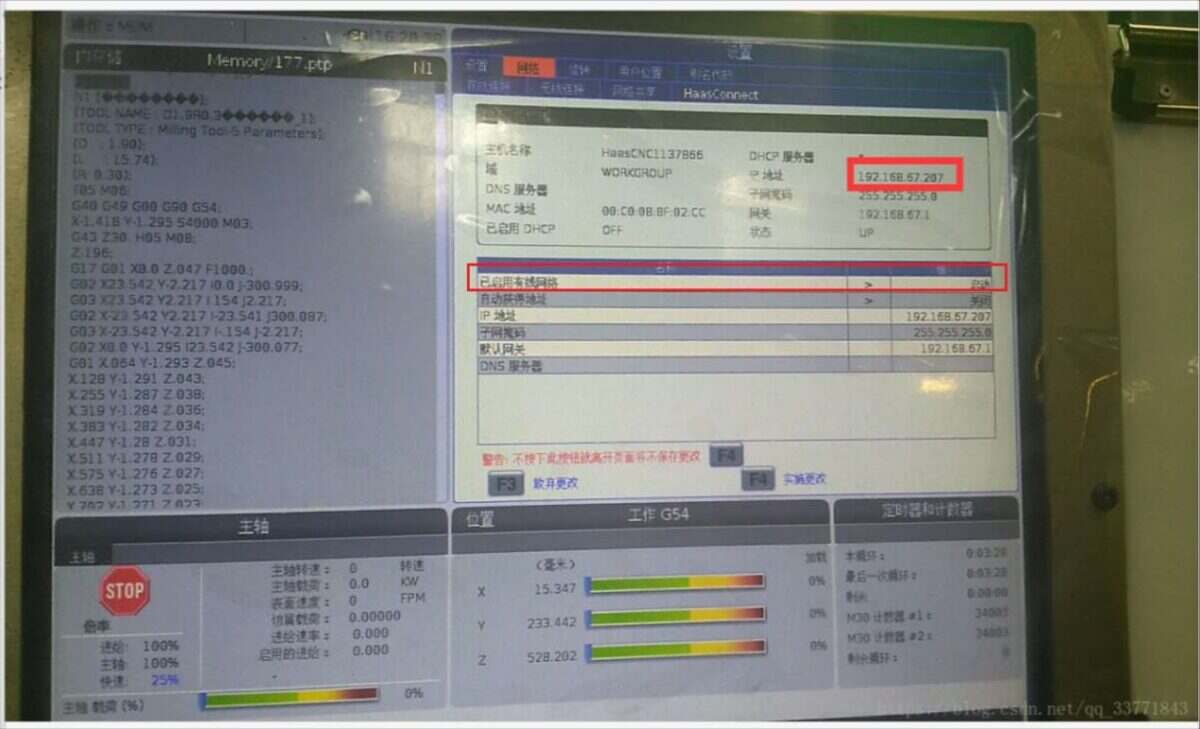
2.1. Locate or Configure IP in the Haas System
Locate the interface shown below and ensure the wired network status is enabled at startup:
2.2. Setting the Port Number
Switch to the Settings interface (to the left of the Network Options button), select the Other tab, and enter the corresponding interface:
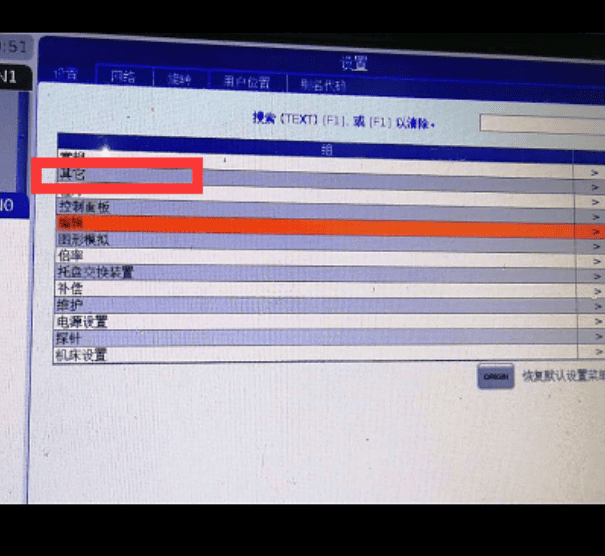
Configure the 143 parameter and set the port number:
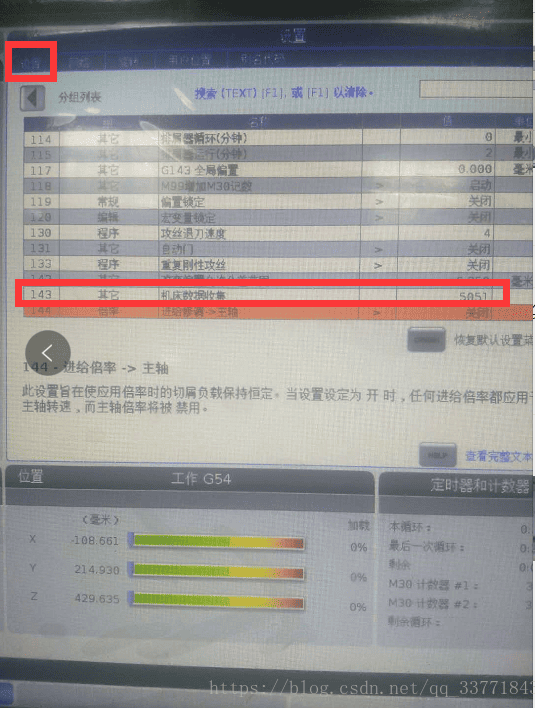
Machine tool side setup complete. Restart the CNC.
3. Gateway-Konfiguration
3.1. CNC-Verbindungseinstellungen
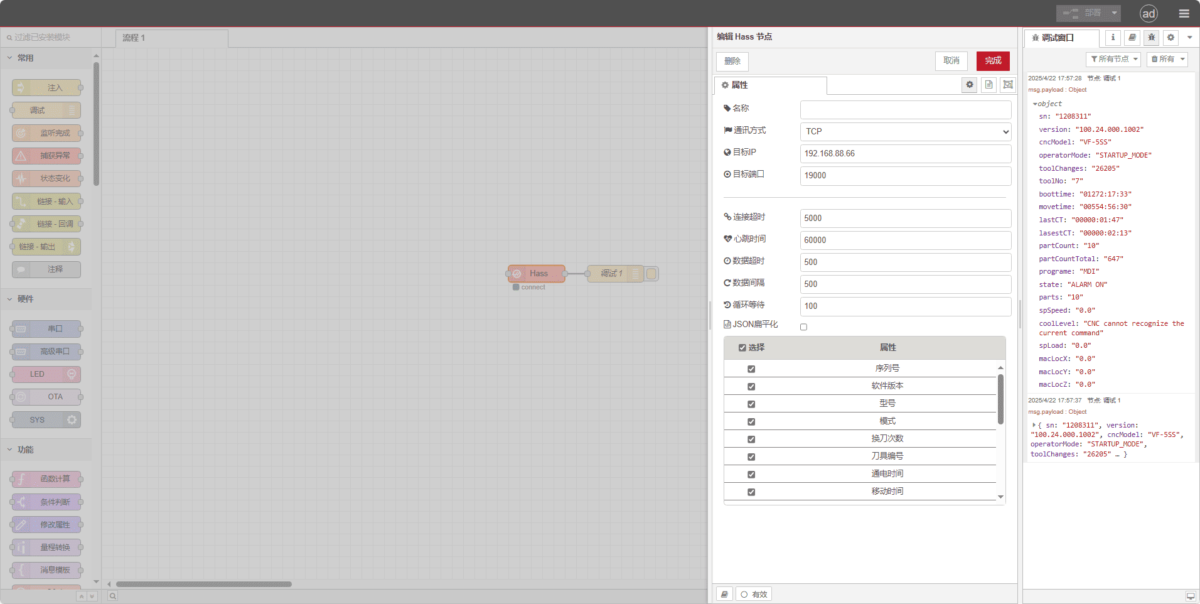
Drag a Hass node from the left panel, double-click to open the settings page, and configure as follows based on the PLC parameters:
Communication Method: TCP
Target IP: 192.168.88.66 (Replace with your machine tool’s IP)
Hafen: 19000 (Enter the port configured on the machine tool)
Zeitüberschreitung der Verbindung: 5000
Heartbeat Interval: 60000
Data Timeout: 500
Data Interval: 500
Cycle Wait: 100
3.2. Prüfung
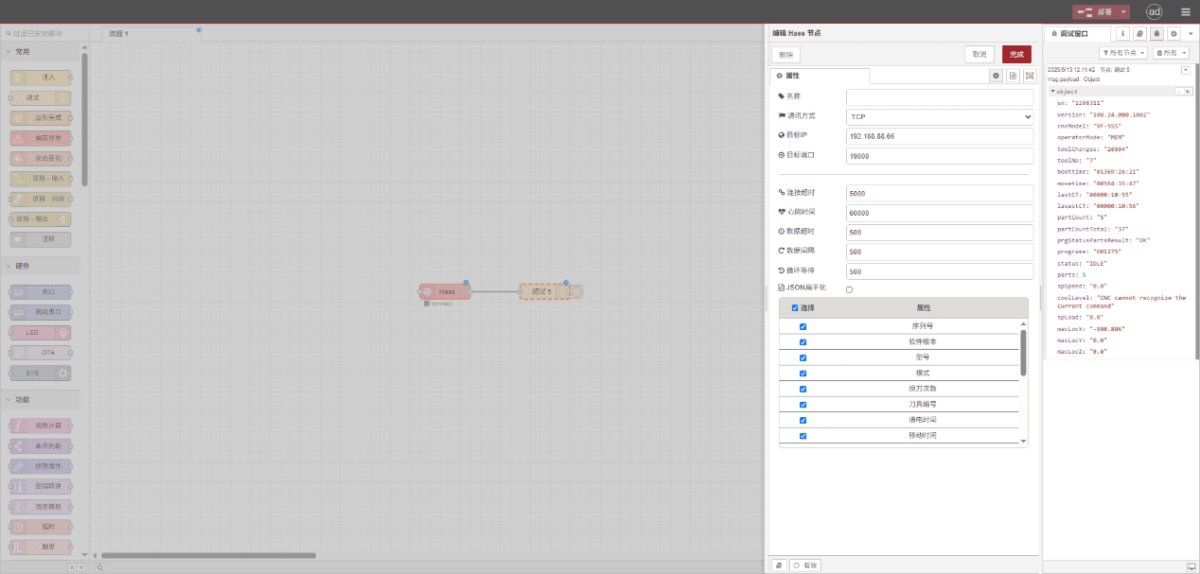
Klicken Sie auf Deploy und beobachten Sie, wie alle paar Sekunden ein Datenpunkt gedruckt wird. Überprüfen Sie die empfangenen Datenpunkte, um die erfolgreiche Kommunikation zu bestätigen!
Die Referenztabelle der Datenpunkte finden Sie unter:
Dies ist eine Inhaltskarte von Yueque. Klicken Sie auf den Link, um sie anzusehen: https://iotrouter.yuque.com/zn3vdn/eg8000/inggeg9b79itoggq
2.Haas CNC (Serial Port) – CNC Gateway Integration
Compatible CNC: VS500
1. Hardware-Anschluss
The Haas CNC utilizes serial communication. In this example, the CNC communication port is a DB-25 pin RS-232 interface. The TXD/RXD/GND pins must be routed out and connected to the gateway’s RS232 interface. Connect TXD to the gateway’s RX, RXD to the gateway’s TX, and GND to the gateway’s GND.
DB25 (25-pin) RS-232 Standard Pinout
| Pin Number | Name | Direction | Beschreibung |
|---|---|---|---|
| 1 | PGND | – | Protective Ground (Chassis Ground) |
| 2 | TXD | Ausgabe | Transmit Data (DTE → DCE) |
| 3 | RXD | Eingabe | Receive Data (DCE → DTE) |
| 4 | RTS | Ausgabe | Request To Send (DTE → DCE) |
| 5 | CTS | Eingabe | Clear To Send (DCE → DTE) |
| 6 | DSR | Eingabe | Data Set Ready (DCE → DTE) |
| 7 | GND | – | Signal Ground (Common Return) |
| 8 | DCD | Eingabe | Data Carrier Detect (DCE → DTE) |
| 20 | DTR | Ausgabe | Data Terminal Ready (DTE → DCE) |
| 22 | RI | Eingabe | Ring Indicator (DCE → DTE) |
2. Machine Tool Settings
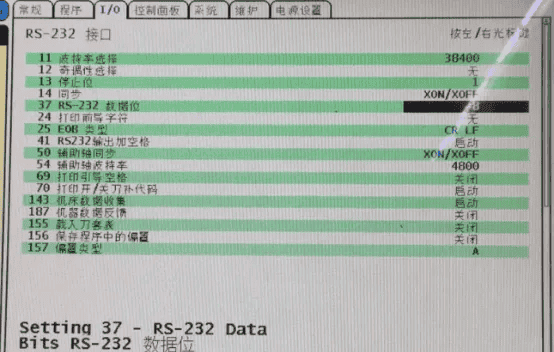
2.1. Serial Port Parameter Configuration
Click the Settings button, select I/O, and modify system parameters.
3. Gateway-Einstellungen
3.1. CNC-Verbindungseinstellungen
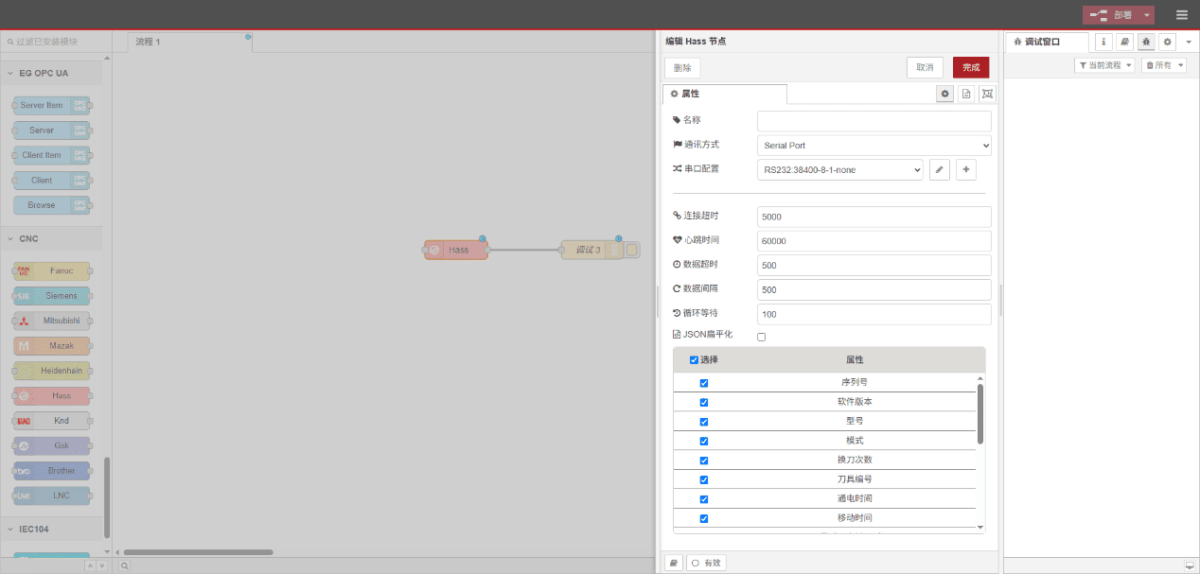
Drag a Hass node from the left panel, double-click to open the settings page, and configure as follows based on the PLC parameters:
Communication Method: Serieller Anschluss
Serieller Anschluss: RS232
Baudrate: 38400
Datenbits: 8
Stoppbits: 1
Parität: Keine
Zeitüberschreitung der Verbindung: 5000
Heartbeat Interval: 60000
Data Timeout: 500
Data Interval: 500
Cycle Wait: 100
3.2. Prüfung
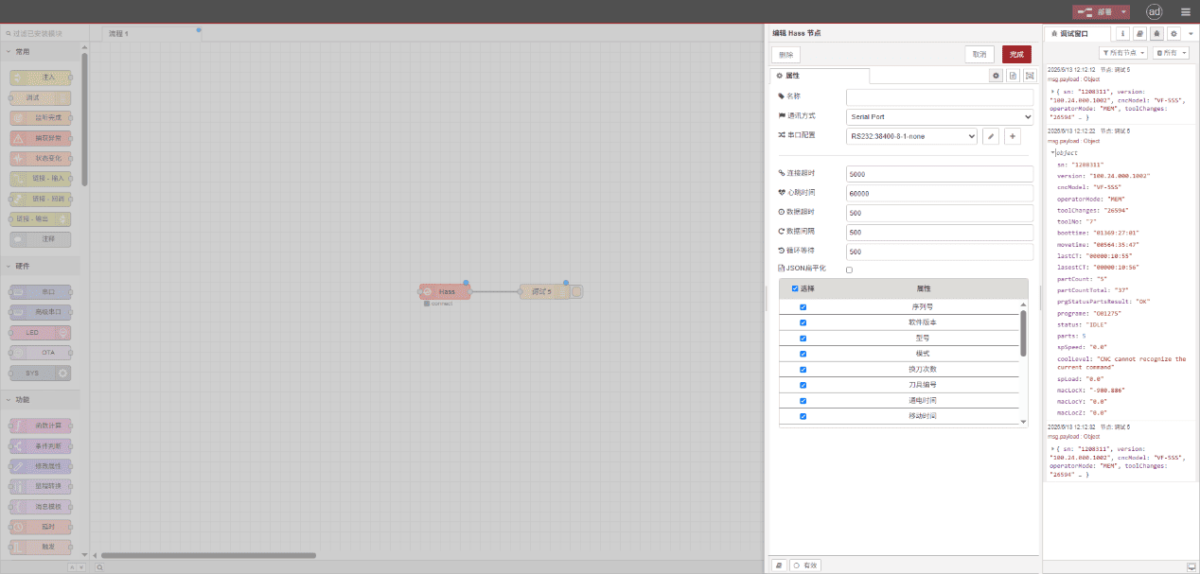
Klicken Sie auf Deploy und beobachten Sie, wie alle paar Sekunden ein Datenpunkt gedruckt wird. Überprüfen Sie die empfangenen Datenpunkte, um die erfolgreiche Kommunikation zu bestätigen!
Die Referenztabelle der Datenpunkte finden Sie unter:
Dies ist eine Inhaltskarte von Yueque. Klicken Sie auf den Link, um sie anzusehen: https://iotrouter.yuque.com/zn3vdn/eg8000/inggeg9b79itoggq

Agnes Wang ist Spezialistin für IoT-Lösungen bei IOTRouter und konzentriert sich auf industrielle IoT-Gateways, Edge-Computing und Lösungen für die industrielle Automatisierung.
Sie ist auf industrielle Kommunikationstechnologien spezialisiert, darunter Modbus, IEC 60870-5-104, MQTT, OPC UA, SPS-Integration und Fernüberwachungsanwendungen. Sie verfasst Fachartikel und Anwendungsleitfäden zu industriellen IoT-Lösungen, Protokollkonvertierung und Edge-Computing.