
As the industry develops rapidly, the number of devices required for data management and reception is also increasing. In order to solve the problem of communication between numerous devices and the problem of combination of devices in a single network, the concept of Internet of Things ( IoT) has been created – a combination or characteristics of devices in a single network based on certain functions. This network is further combined with similar networks in together, thereby creating a larger network, and so on.
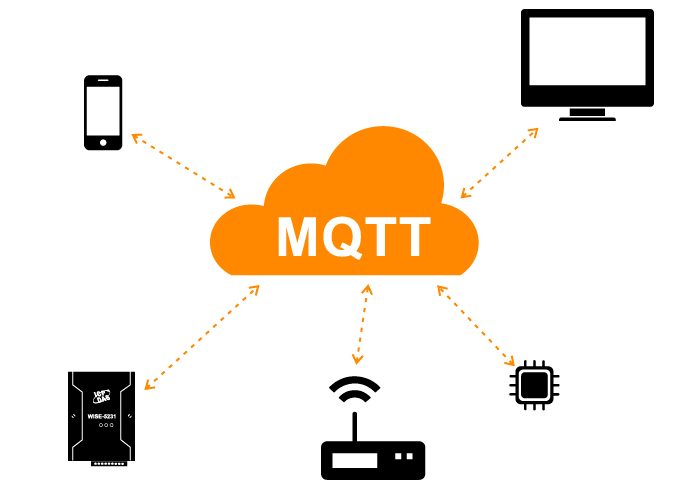
In such a network, devices interact with each other through various interfaces and communication protocols. As we are considering the industrial implementation of the IoT concept, which should use industrial equipment with its own protocols and hardware, let us start exploring the IIoT concept (Industrial Internet of Things).
To communicate, devices can use various industrial protocols. For this purpose, MQTT is popular.
What is MQTT?
MQTT or Message Queuing Telemetry Transport is a lightweight, open messaging protocol used for data transfer in remote locations where a “small code footprint” is required or where network bandwidth is limited. These advantages allow the implementation of this protocol in M2M systems (Machine to Machine) and IIoT systems (Industrial Internet of Things).
There also exists a protocol variant MQTT-SN (MQTT for Sensor Networks), formerly known as MQTT-S, which is designed for use with embedded wireless devices that do not support TCP/IP networks, such as ZigBee.
Functions of MQTT protocol
The main functions of the MQTT protocol:
● Asynchronous protocol
● Compact messages
● Operate when the data transmission line connection is unstable
● Support multiple quality of service (QoS) levels
● Easily integrate new devices
On the application layer, the MQTT protocol works on top of the Protocolo TCP/IP and uses port 1883 by default (port 8883 if connecting over SSL).

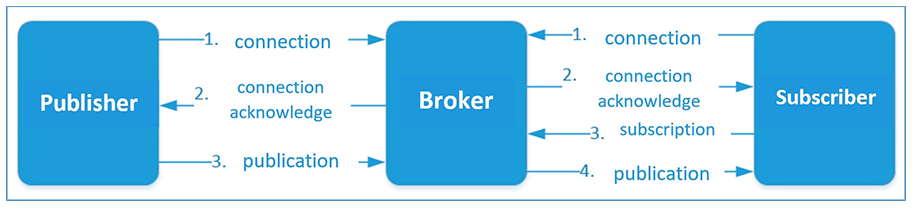
In the MQTT protocol, message exchange occurs between a client (which may be a message publisher or a message subscriber) and a message broker (such as Mosquitto MQTT).
The publisher sends data on the Corredor MQTT with an explicit topic specified in the message. Subscribers can receive various data from multiple publishers based on their subscriptions to the corresponding topics.
MQTT devices use certain types of messages to communicate with brokers. The main types are as follows:
● Connection – Establish a connection to Message Broker
● Disconnect – Disconnect from the message broker
● Publish – publish data about a topic in Message Broker
● Subscription – Subscribe to a topic on the message broker
● Unsubscribe – Unsubscribe from the topic
The structure of the message
MQTT messages contain the following parts:
● Fixed header (appears in all messages)
● Variable headers (appear in some messages)
● Data, payload (present in some messages)
1.Fixed head

Message type – eg: CONNECT, SUBSCRIBE, PUBLISH, etc.
Flags unique to each MQTT packet – These 4 bits are used for auxiliary flags, the presence and status of which depends on the message type.
Remaining Length – Current message length (variable header data), size 1 to 4 bytes.
Overall, there are 15 message types in the MQTT protocol:
| Message Type | Value | Direction | Descripción |
|---|---|---|---|
| Reservado | 0000 (0) | Forbidden | Reservado |
| CONNECT | 0001 (1) | C → S | Client request to establish a connection |
| CONNACK | 0010 (2) | S → C | Connection acknowledgment |
| PUBLISH | 0011 (3) | C ↔ S | Publish message |
| PUBACK | 0100 (4) | C ↔ S | Publish acknowledgment |
| PUBREC | 0101 (5) | C ↔ S | Publish received (QoS 2 step 1) |
| PUBREL | 0110 (6) | C ↔ S | Publish release (QoS 2 step 2) |
| PUBCOMP | 0111 (7) | C ↔ S | Publish complete (QoS 2 step 3) |
| SUBSCRIBE | 1000 (8) | C → S | Client subscribe request |
| SUBACK | 1001 (9) | S → C | Subscription acknowledgment |
| UNSUBSCRIBE | 1010 (10) | C → S | Unsubscribe request |
| UNSUBACK | 1011 (11) | S → C | Unsubscribe acknowledgment |
| PINGREQ | 1100 (12) | C → S | Ping request |
| PINGRESP | 1101 (13) | S → C | Ping response |
| DISCONNECT | 1110 (14) | C → S | Client request to disconnect |
| Reservado | 1111 (15) | Forbidden | Reservado |
The first 4 most significant bits of the fixed header are used as specific flags:

DUP – Duplicate is set when a client or MQTT broker submits a retransmitted packet (used in PUBLISH, SUBSCRIBE, UNSUBSCRIBE, PUBREL). If this flag is set, the variable header must contain the message ID (message identifier).
QoS – Quality of Service (0,1,2)
Retention – When data is published with the retention flag, it will be stored by the broker. The broker will send a message with this flag as soon as a new subscription to the topic is established. Only used in PUBISH type messages.
2.Variable Title
Variable headers exist in some headers. It contains the following data:
● Packet identifier – present in all message types except: CONNECT, CONNACK, PUBLISH(сQoS <1), PINGREQ, PINGRESP, DISCONNECT
● Protocol name – only shown in CONNECT message type
● Protocol version – only exists in CONNECT message type
● connection flags – flags that specify client behavior during a connection

Username – If this flag is set, a username must be present in the payload (for client authentication)
Password – If this flag is set, the password must be present in the payload (used for client authentication)
Will be retained – If this flag is set to 1, the broker will store a Will message.
Will QoS – Will Message’s quality of service. If the Will flag is set, Will QoS and Will Reservation must be present.
Will flag – If this flag is set, after a client disconnects from the broker without sending a DISCONNECT command (in case of unpredictable shutdown, failure, etc.), the broker will notify all connected clients with a so-called will message.
Clean Session – If this flag is set to 0, the broker stores a session, all client subscriptions will be sent over the client’s next connection, and when the client disconnects, the broker will receive all messages from QoS1 and QoS2. Therefore, if this flag is set to 1, by the next connection, the client must subscribe to all topics again.
● Session existence – applied in CONNACK type messages. If the Broker accepts connections with Clean Session set to 1, Session Present (SP) must be set to 0. If the Broker accepts a connection with Clean Session set to 0, the value set in the SP depends on whether the Broker has stored session state for this client (if so, the SP must be set to 1, and vice versa). The session exists flag enables the client to determine whether session state has been stored.
● Connection Return Code – If for some reason the proxy is unable to receive a well-formed CONNACK packet from the client, it must set the appropriate value in the second byte of the CONNACK packet in the following table:
| Value | Return Code Response | Descripción |
|---|---|---|
| 0 | 0x00 – Connection Accepted | Connection successful |
| 1 | 0x01 – Connection Refused: Unacceptable Protocol Version | Broker does not support the requested protocol version |
| 2 | 0x02 – Connection Refused: Identifier Rejected | Client ID is not valid or not allowed |
| 3 | 0x03 – Connection Refused: Server Unavailable | Broker is unavailable |
| 4 | 0x04 – Connection Refused: Bad Username or Password | Incorrect username or password |
| 5 | 0x05 – Connection Refused: Not Authorized | Client is not authorized to connect |
| 6–255 | Reserved for future use |
The content and format of data transferred via MQTT messages are defined in the device. The data size can be calculated by subtracting the length of the variable header from the remaining length.
3.Data, payload
The payload is the application-level data carried inside an MQTT message. It is included only in specific message types, such as PUBLISH, CONNECT (authentication fields), and Will messages. The MQTT standard does not define a fixed payload structure—the content and format are determined by the device or application.
Depending on the use case, the payload may contain sensor data, JSON objects, binary telemetry, command values, or authentication information such as Username, Password, or Will Message. The payload length is calculated by subtracting the size of the variable header from the Remaining Length field in the fixed header.
Quality of Service in MQTT Protocol (QoS)
MQTT supports three levels of quality of service (QoS) when sending messages.
QoS 0 at most once. At this level, the publisher sends one message at a time to the broker and does not wait for any response, ie send it and forget about it.

QoS 1 at least once. This level ensures that messages are delivered to the broker, but messages can be copied from the publisher. Once the copy is received, the broker sends the message to the Subscriber again and forwards the message receipt acknowledgment to the Publisher . If the publisher does not get a PUBACK message from the broker, it will attempt to re-deliver this packet, setting DUP to 1.

QoS 2 exactly once. At this level, message delivery to the client is guaranteed and duplicate copies are not possible.
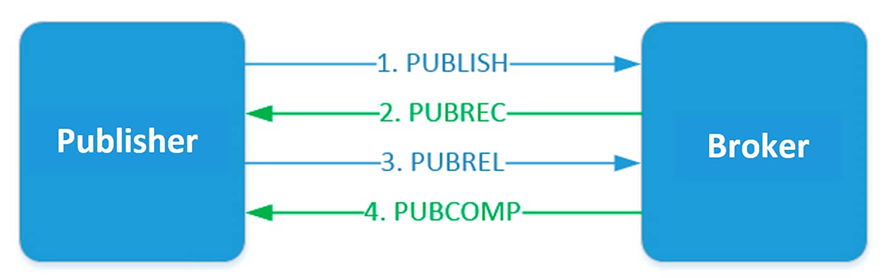
The publisher sends a message to the broker. The message contains a unique packet ID, QoS=2 and DUP=0. The publisher stores unacknowledged messages unless it gets a PUBREC response from the broker. The proxy replies with a PUBREC message containing the same group ID. After receiving this message, the publisher sends a PUBREL with the same packet ID. The broker must store a copy of the message until it obtains a PUBREL. After the broker receives PUBREL, it deletes the message copy and sends a PUBCOMP message about the completed transaction to the publisher.