
The EC series ARM industrial computers run an optimized version of Ubuntu at their core, providing a stable foundation for industrial scenarios. Additionally, they come pre-installed with Nodo-RED y NeuronEX-Lite, providing a clear differentiation advantage.
- Nodo-RED: An open-source visual programming tool. It offers a browser-based flow orchestration interface where devices and data processing can be connected and configured via drag-and-drop.
- NeuronEX-Lite: A lightweight edge computing software designed for industrial IoT. It supports multiple industrial protocols, enabling fast device connectivity and millisecond-level real-time data processing.
This “Double N” software architecture allows developers to quickly build business logic through drag-and-drop (Node-RED) while providing professional capabilities such as protocol parsing, device connection, and data collection (NeuronEX-Lite). The EC series achieves a seamless combination of rapid business development and professional industrial data acquisition, significantly improving development efficiency and operational reliability in industrial IoT solutions.
To help developers understand and use EC gateways, we previously released the EC100 Development Guide. Now, we present its sister guide — EC300 Development Guide. Before starting, if you’ve forgotten basic info such as the EC gateway backend URL, please review the EC Series Gateway Learning Guide.
Development Preparation
This guide applies to the following EC300 series models:
- EC300
- EC301
- EC300P
Tools
| Tool Category | Recommended Tool | Descargar |
|---|---|---|
| SSH Tool | MobaXterm or any preferred SSH tool | MobaXterm_Installer_v20.5.zip |
| Serial Debug Tool | XCOM or any preferred serial debug tool | XCOM V2.6.zip |
| Hardware Tool | Common auxiliary debug tools: CAN to USB / RS485 to USB / RS232 to USB. Prepare yourself | NONE |
| Cross-Compile Toolchain | gcc-arm-10.2-2020.11-x86_64-aarch64-none-linux-gnu.zip |
Software Environment
| Software | Version |
|---|---|
| OS | Linux integrado |
| Kernel | Linux 5.10.209 |
| Nodejs | v22.17.0 |
| Python | python3.8 |
| Concha | bash |
| GLIBC | GLIBC_2.31 |
| Docker | V26.1.3 |
| QT Library | V5.15.10 |
| Desktop Environment | Xfce4 |
Device Resources
| Categoría | Details | Notes |
|---|---|---|
| Almacenamiento | 16G total | Factory default free space ≈ 9 GB; Expandable via SD card or M.2 NVMe SSD |
| RAM | 2G |
Factory default free space ≈ 1.4 GB |
| CPU | 4*Cortex-A53@1.8GHz | Factory default free space ≈ 98% |
| NPU | 1 TPOS | Factory default free space ≈ 100% |
Peripheral Interfaces
1. Debug Port
EC300 series exposes system debug via Type-C.
- Default login:
root - Default password: see Open System Permissions documentation in the Ruta de aprendizaje del ordenador industrial ARM serie EC.
2. Serial Interfaces
| Interfaz | Device File | EC300 | EC300P | EC301 |
|---|---|---|---|---|
| RS485-1 | /dev/ttyS7 | ✔️ | ✔️ | ✔️ |
| RS485-2 | /dev/ttyS2 | ❌ | ❌ | ✔️ |
| RS232 | /dev/ttyS3 | ❌ | ❌ | ✔️ |
Note: RS485 handles sending/receiving automatically; users don’t need to switch manually.
2.1 Quick Test
Use the minicom tool for testing. For detailed instructions, you can Google it or consult an AI.
2.2 C Example
uart_example.c :
#include <stdio.h>
#include <stdlib.h>
#include <string.h>
#include <unistd.h>
#include <fcntl.h>
#include <termios.h>
#include <errno.h>
#include <sys/select.h>

#define BUFFER_SIZE 256

typedef struct {
    int baud_rate;      // baud rate
    int data_bits;      // data bits (5,6,7,8)
    int stop_bits;      // stop bits (1,2)
    char parity;        // Parity bit (N: None, O: Odd, E: Even)
} SerialConfig;

int set_serial_attr(int fd, SerialConfig *config)
{
    struct termios tty;

    if (tcgetattr(fd, &tty) < 0) { perror("tcgetattr"); return -1; } // set the baud rate
    speed_t speed;
    switch (config->baud_rate) {
        case 9600:   speed = B9600; break;
        case 19200:  speed = B19200; break;
        case 38400:  speed = B38400; break;
        case 57600:  speed = B57600; break;
        case 115200: speed = B115200; break;
        default:
            fprintf(stderr, "Unsupported baud rate, using 115200\n");
            speed = B115200;
    }
    cfsetispeed(&tty, speed);
    cfsetospeed(&tty, speed);

    // set the data bits
    tty.c_cflag &= ~CSIZE;
    switch (config->data_bits) {
        case 5: tty.c_cflag |= CS5; break;
        case 6: tty.c_cflag |= CS6; break;
        case 7: tty.c_cflag |= CS7; break;
        case 8: tty.c_cflag |= CS8; break;
        default:
            fprintf(stderr, "Unsupported data bits, using 8\n");
            tty.c_cflag |= CS8;
    }

    // set the stop bits
    if (config->stop_bits == 2) {
        tty.c_cflag |= CSTOPB;
    } else {
        tty.c_cflag &= ~CSTOPB;
    }

    // set the parity bit
    switch (config->parity) {
        case 'N': case 'n':
            tty.c_cflag &= ~PARENB;  // Parity: None
            break;
        case 'O': case 'o':
            tty.c_cflag |= PARENB;   // Parity: Odd
            tty.c_cflag |= PARODD;
            break;
        case 'E': case 'e':
            tty.c_cflag |= PARENB;   // Parity: Even
            tty.c_cflag &= ~PARODD;
            break;
        default:
            fprintf(stderr, "Unsupported parity, using N\n");
            tty.c_cflag &= ~PARENB;
    }

    // Other settings
    tty.c_cflag |= (CLOCAL | CREAD);    // Enable Receive and Local Mode
    tty.c_cflag &= ~CRTSCTS;            // No hardware flow control

    tty.c_lflag &= ~(ICANON | ECHO | ECHOE | ISIG); // Raw Input Mode
    tty.c_oflag &= ~OPOST;              // Raw Output Mode

    tty.c_cc[VMIN] = 1;                 // Minimum Read Characters
    tty.c_cc[VTIME] = 0;                // Read Timeout (Unit: 0.1 seconds)

    if (tcsetattr(fd, TCSANOW, &tty) < 0) {
        perror("tcsetattr");
        return -1;
    }

    return 0;
}

int main(int argc, char *argv[])
{
    int fd;
    char *portname;

    if (argc < 2) {
        fprintf(stderr, "Usage: %s \n", argv[0]);
        exit(EXIT_FAILURE);
    }

    portname = argv[1];

    // Configure Serial Port Parameters
    SerialConfig config = {
        .baud_rate = 115200,  // baud rate
        .data_bits = 8,       // data bits
        .stop_bits = 1,       // stop bits
        .parity = 'N'         // parity bit (N: None, O: Odd, E: Even)
    };

    fd = open(portname, O_RDWR | O_NOCTTY | O_NONBLOCK);
    if (fd < 0) {
        perror("open");
        exit(EXIT_FAILURE);
    }

    if (set_serial_attr(fd, &config)) {
        close(fd);
        exit(EXIT_FAILURE);
    }

    printf("Serial port echo test running on %s\n", portname);
    printf("Configuration: %d baud, %d data bits, %d stop bit, %c parity\n",
           config.baud_rate, config.data_bits, config.stop_bits, config.parity);
    printf("Press Ctrl+C to exit.\n");

    fd_set readfds;
    char buffer[BUFFER_SIZE];
    int n;

    while (1) {
        FD_ZERO(&readfds);
        FD_SET(fd, &readfds);

        // Wait indefinitely for data (timeout disabled)
        if (select(fd + 1, &readfds, NULL, NULL, NULL) < 0) { perror("select"); break; } if (FD_ISSET(fd, &readfds)) { n = read(fd, buffer, BUFFER_SIZE - 1); if (n > 0) {
                buffer[n] = '\0';
                printf("Received %d bytes: %s\n", n, buffer);

                // Echo Data
                write(fd, buffer, n);
            } else if (n < 0) {
                if (errno != EAGAIN && errno != EWOULDBLOCK) {
                    perror("read");
                    break;
                }
            }
        }
    }

    close(fd);
    return 0;
}
Compile: gcc uart_example.c -o uart_example
RS485-1 Test Run: ./uart_example /dev/ttyS7
2.3 Python Example
uart_example.py:
import serial
import select
import sys
import tty

class SerialConfig:
    def __init__(self):
        self.baud_rate = 115200  # baud rate
        self.data_bits = 8       # data bits
        self.stop_bits = 1       # stop bits
        self.parity = 'N'        # parity bit (N: None, O: Odd, E: Even)

def set_serial_config(ser, config):
    """Configure Serial Port Parameters"""
    # set the baud rate
    ser.baudrate = config.baud_rate

    # set the data bits
    if config.data_bits == 5:
        ser.bytesize = serial.FIVEBITS
    elif config.data_bits == 6:
        ser.bytesize = serial.SIXBITS
    elif config.data_bits == 7:
        ser.bytesize = serial.SEVENBITS
    else:  # Default is 8 bits
        ser.bytesize = serial.EIGHTBITS

    # set the stop bits
    if config.stop_bits == 2:
        ser.stopbits = serial.STOPBITS_TWO
    else:  # Default is 1 bit
        ser.stopbits = serial.STOPBITS_ONE

    # set the parity bit
    if config.parity.upper() == 'O':
        ser.parity = serial.PARITY_ODD
    elif config.parity.upper() == 'E':
        ser.parity = serial.PARITY_EVEN
    else:  # Default is None (no parity)
        ser.parity = serial.PARITY_NONE

    # Disable hardware flow control
    ser.rtscts = False
    # Disable software flow control
    ser.xonxoff = False
    # Set timeout
    ser.timeout = 0.1  # 100 ms timeout

    return ser

def main():
    if len(sys.argv) < 2:
        print(f"Usage: {sys.argv[0]} <Serial device>")
        print(f"Example: {sys.argv[0]} /dev/ttyS7")
        sys.exit(1)

    portname = sys.argv[1]
    buff_size = 256

    # Initialize Serial Port Configuration
    config = SerialConfig()

    try:
        # Open the serial port
        ser = serial.Serial()
        ser.port = portname
        # Apply the configuration and open the serial port
        ser = set_serial_config(ser, config)
        ser.open()

        if not ser.is_open:
            print("Unable to open the serial port")
            sys.exit(1)

        print(f"Serial port {portname} opened successfully")
        print(f"Set: baud rate {config.baud_rate}, data bits {config.data_bits}, "
              f"Stop bits {config.stop_bits}, Parity {config.parity}")
        print("Press Ctrl+C to exit the program")

        # Use select to monitor serial port data
        while True:
            # Wait for serial port data to be readable
            readable, _, _ = select.select([ser.fileno()], [], [], None)

            if readable:
                # Read data
                data = ser.read(buff_size - 1)
                if data:
                    # Attempt to decode as a string; if it fails, display in hexadecimal
                    try:
                        text = data.decode('utf-8')
                    except UnicodeDecodeError:
                        text = f"[Binary data] {data.hex()}"

                    print(f"Received {len(data)} bytes: {text}")

                    # Echo data
                    ser.write(data)

    except serial.SerialException as e:
        print(f"Serial port error: {e}")
        sys.exit(1)
    except KeyboardInterrupt:
        print("\nUser interrupted, exiting the program")
    finally:
        if 'ser' in locals() and ser.is_open:
            ser.close()
            print("Serial port closed")

if __name__ == "__main__":
    main()
First, install the required dependencies:
pip install pyserial
RS485-1 Test Run: python uart_example.py /dev/ttyS7
3. LED
The EC300 series has 6 LEDs in total, 4 of which are user-programmable.
| Hardware | IO Index | IO Number | Chip | Notes |
|---|---|---|---|---|
| POW | / | / | / | Power indicator |
| EJECUTAR | 50 | GPIO1_C2 | gpiochip1 | Used by the system; blinking when running |
| LED1 | 137 | GPIO4_B1 | gpiochip4 | User-programmable |
| LED2 | 51 | GPIO1_C3 | gpiochip1 | User-programmable |
| LED3 | 143 | GPIO4_B7 | gpiochip4 | User-programmable |
| LED4 | 52 | GPIO1_C4 | gpiochip1 | User-programmable |
Note: The IO index is calculated from the IO number.
3.1 Quick Test
led_example.sh:
#!/bin/bash

# Check whether a GPIO index has been provided
if [ -z "$1" ]; then
    echo "Usage: $0 "
    exit 1
fi

GPIO=$1
GPIO_PATH="/sys/class/gpio/gpio$GPIO"
EXPORT_PATH="/sys/class/gpio/export"

# Check whether the GPIO has already been exported
if [ ! -d "$GPIO_PATH" ]; then
    echo "Exporting GPIO $GPIO..."
    echo "$GPIO" > "$EXPORT_PATH"
    if [ $? -ne 0 ]; then
        echo "Failed to export GPIO $GPIO. Check permissions or if it's in use."
        exit 1
    fi
else
    echo "GPIO $GPIO is already exported."
fi

# Set the GPIO direction to output
echo "out" > "$GPIO_PATH/direction"

# Set the initial value to low level
echo 0 > "$GPIO_PATH/value"

echo "Toggling GPIO $GPIO every 1 second. Press Ctrl+C to stop."

# Start toggling in a loop
while true; do
    echo 1 > "$GPIO_PATH/value"
    sleep 1
    echo 0 > "$GPIO_PATH/value"
    sleep 1
done
Test Run:
bash led_example.sh 137
3.2 C Example
led_example.c:
#include <stdio.h>
#include <stdlib.h>
#include <string.h>
#include <unistd.h>
#include <fcntl.h>
#include <sys/ioctl.h>
#include <linux/gpio.h>
#include <errno.h>

#define GPIO_CHIP "/dev/gpiochip4"  // Use gpiochip1
#define GPIO_LINE 137%32             // The offset of the GPIO to be controlled on chip1
#define PERIOD_US 500000            // Period (microseconds)

int main() {
    struct gpiohandle_request req;
    struct gpiohandle_data data;
    int fd, ret;

    // Open the GPIO character device
    fd = open(GPIO_CHIP, O_RDWR);
    if (fd < 0) {
        perror("Unable to open the GPIO device");
        return EXIT_FAILURE;
    }

    // Set up the GPIO request
    memset(&req, 0, sizeof(req));
    req.lineoffsets[0] = GPIO_LINE;  // GPIO line number
    req.flags = GPIOHANDLE_REQUEST_OUTPUT;  // Set to output mode
    req.default_values[0] = 0;       // Set the initial value to low level
    strcpy(req.consumer_label, "gpio-toggle");  // Consumer label
    req.lines = 1;                   // Number of GPIO lines to control

    // Request GPIO control
    ret = ioctl(fd, GPIO_GET_LINEHANDLE_IOCTL, &req);
    if (ret < 0) {
        perror("Unable to acquire GPIO control");
        close(fd);
        return EXIT_FAILURE;
    }

    // Close the GPIO character device (the line handle has already been acquired)
    close(fd);

    printf("Controlling GPIO chip1 line %d with a period of %.1f seconds...\n",
           GPIO_LINE, PERIOD_US/1000000.0);

    // Toggle GPIO level periodically
    while (1) {
        data.values[0] = 1;  // High level
        ret = ioctl(req.fd, GPIOHANDLE_SET_LINE_VALUES_IOCTL, &data);
        if (ret < 0) {
            perror("Failed to set GPIO to high level");
            break;
        }
        usleep(PERIOD_US/2);

        data.values[0] = 0;  // Low level
        ret = ioctl(req.fd, GPIOHANDLE_SET_LINE_VALUES_IOCTL, &data);
        if (ret < 0) {
            perror("Failed to set GPIO to low level");
            break;
        }
        usleep(PERIOD_US/2);
    }

    // Close the GPIO line handle
    close(req.fd);

    return EXIT_SUCCESS;
}
Compile: gcc led_example.c -o led_example
Test Run: ./led_example
3.3 Python Example
led_example.py:
import os
import time
import sys

# Define constants
GPIO_CHIP = 4          # GPIO chip number
GPIO_LINE = 137 % 32    # Offset of the GPIO to be controlled on the line
PERIOD_US = 500000      # Period (microseconds)

def export_gpio(gpio_num):
    """Export GPIO"""
    try:
        with open('/sys/class/gpio/export', 'w') as f:
            f.write(str(gpio_num))
        time.sleep(0.1)  # Wait for export to complete
        return True
    except IOError as e:
        if "already exists" in str(e):
            return True  # GPIO already exported
        print(f"Failed to export GPIO: {e}")
        return False

def set_gpio_direction(gpio_num, direction):
    """Set GPIO direction"""
    try:
        with open(f'/sys/class/gpio/gpio{gpio_num}/direction', 'w') as f:
            f.write(direction)
        return True
    except IOError as e:
        print(f"Failed to set GPIO direction: {e}")
        return False

def set_gpio_value(gpio_num, value):
    """Set GPIO value"""
    try:
        with open(f'/sys/class/gpio/gpio{gpio_num}/value', 'w') as f:
            f.write(str(value))
        return True
    except IOError as e:
        print(f"Failed to set GPIO value: {e}")
        return False

def unexport_gpio(gpio_num):
    """Unexport GPIO"""
    try:
        with open('/sys/class/gpio/unexport', 'w') as f:
            f.write(str(gpio_num))
        return True
    except IOError as e:
        print(f"Failed to unexport GPIO: {e}")
        return False

def cleanup_gpio(actual_gpio):
    """Clean up GPIO resources: first turn off LED, then unexport GPIO"""
    try:
        print("Turn off LED...")
        # Set GPIO to low level first to turn off LED
        if set_gpio_value(actual_gpio, 0):
            print("LED turned off")
        else:
            print("Failed to turn off LED")

        #  Wait a short time to ensure LED is off
        time.sleep(0.05)

        # Then unexport GPIO
        print("Unexport GPIO...")
        if unexport_gpio(actual_gpio):
            print("GPIO successfully unexported")
        else:
            print("Failed to unexport GPIO")

    except Exception as e:
        print(f"Error occurred while cleaning up GPIO resources: {e}")

def main():
    # Calculate the actual GPIO number
    actual_gpio = GPIO_CHIP * 32 + GPIO_LINE

    print(f"GPIO chip: {GPIO_CHIP}, GPIO line: {GPIO_LINE}")
    print(f"Actual GPIO number: {actual_gpio}")
    print(f"Blink period: {PERIOD_US/1000000.0:.1f} seconds")
    print("Press Ctrl+C to stop the program")

    try:
        # Export GPIO
        if not export_gpio(actual_gpio):
            return 1

        # Set GPIO to output mode
        if not set_gpio_direction(actual_gpio, 'out'):
            cleanup_gpio(actual_gpio)
            return 1

        print("Start controlling LED blinking...")

        # Toggle GPIO level periodically
        while True:
            # Set to high level
            if not set_gpio_value(actual_gpio, 1):
                break
            time.sleep(PERIOD_US / 2000000.0)  # Wait for half a period

            # Set to low level
            if not set_gpio_value(actual_gpio, 0):
                break
            time.sleep(PERIOD_US / 2000000.0)  # Wait for half a period

    except KeyboardInterrupt:
        print("\nProgram stopped")
    except Exception as e:
        print(f"An error occurred: {e}")
        import traceback
        traceback.print_exc()
    finally:
        # Clean up GPIO resources: first turn off LED, then unexport GPIO
        print("Start cleaning up GPIO resources...")
        cleanup_gpio(actual_gpio)
        print("Program ended")

if __name__ == "__main__":
    sys.exit(main())
Test Run:
python led_example.py
4. CAN
The EC301 has two CAN interfaces:
| Hardware Interface | Interfaz de red |
|---|---|
| CAN1 [H1 L1] | can0 |
| CAN2 [H2 L2] | can1 |
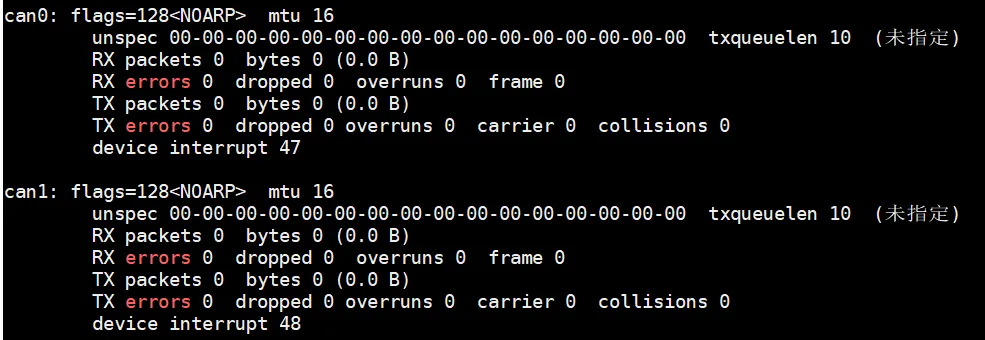
4.1 Quick Test
Connect CAN1 and CAN2 together; test via the command line:
can_example.sh:
#!/bin/bash
#First, initialize can0 and can1 with a baud rate of 500k, then set can0 to receive data and can1 to send data.

ip link set can0 down
ip link set can1 down

ip link set can0 type can bitrate 500000
ip link set can1 type can bitrate 500000

ip link set can0 up
ip link set can1 up

echo 4096 > /sys/class/net/can0/tx_queue_len
echo 4096 > /sys/class/net/can1/tx_queue_len

candump can0 &

cansend can1 001234EF#00.11.22.33.44.55.66.77
4.2 C Example
can_example.c:
#include <stdio.h>
#include <stdlib.h>
#include <string.h>
#include <unistd.h>
#include <net/if.h>
#include <sys/ioctl.h>
#include <sys/socket.h>
#include <linux/can.h>
#include <linux/can/raw.h>
#include <fcntl.h>
#include <errno.h>
#include <stdint.h>
#include <sys/wait.h>

#define SEND_CAN "can0"   // CAN interface for sending data
#define RECV_CAN "can1"   // CAN interface for receiving data
#define BITRATE 500000    // Baud rate 500k
#define SAMPLE_POINT 0.8
#define TX_QUEUE_LEN 4096

// Configure CAN interface
int setup_can_interface(const char *ifname) {
    char cmd[512];
    FILE *fp;

    //  Close interface
    snprintf(cmd, sizeof(cmd), "ip link set %s down", ifname);
    system(cmd);

    // Set CAN parameters
    snprintf(cmd, sizeof(cmd),
             "ip link set %s type can bitrate %d sample-point %.1f",
             ifname, BITRATE, SAMPLE_POINT);
    if (system(cmd) != 0) {
        fprintf(stderr, "Failed to configure CAN interface %s\n", ifname);
        return -1;
    }

    // Set TX queue length
    snprintf(cmd, sizeof(cmd), "/sys/class/net/%s/tx_queue_len", ifname);
    fp = fopen(cmd, "w");
    if (fp == NULL) {
        perror("Failed to open tx_queue_len");
        return -1;
    }
    fprintf(fp, "%d", TX_QUEUE_LEN);
    fclose(fp);

    // Enable interface
    snprintf(cmd, sizeof(cmd), "ip link set %s up", ifname);
    if (system(cmd) != 0) {
        fprintf(stderr, "Failed to bring up CAN interface %s\n", ifname);
        return -1;
    }

    printf("CAN interface %s configured:\n", ifname);
    printf("  Bitrate: %d\n", BITRATE);
    printf("  Sample point: %.1f\n", SAMPLE_POINT);
    printf("  TX queue length: %d\n", TX_QUEUE_LEN);

    return 0;
}

//Monitor CAN interface data in a child process
void receive_can_messages() {
    int recv_sock;
    struct sockaddr_can recv_addr;
    struct ifreq recv_ifr;
    struct can_frame frame;
    int nbytes;

    // Initialize receiver socket
    if ((recv_sock = socket(PF_CAN, SOCK_RAW, CAN_RAW)) < 0) {
        perror("Receive socket creation failed");
        exit(EXIT_FAILURE);
    }

    // Bind receiver interface
    strcpy(recv_ifr.ifr_name, RECV_CAN);
    if (ioctl(recv_sock, SIOCGIFINDEX, &recv_ifr) < 0) {
        perror("IOCTL for receive interface failed");
        close(recv_sock);
        exit(EXIT_FAILURE);
    }
    recv_addr.can_family = AF_CAN;
    recv_addr.can_ifindex = recv_ifr.ifr_ifindex;
    if (bind(recv_sock, (struct sockaddr *)&recv_addr, sizeof(recv_addr)) < 0) {
        perror("Receive socket bind failed");
        close(recv_sock);
        exit(EXIT_FAILURE);
    }

    printf("Receive process started (listening on %s)...\n", RECV_CAN);


    while (1) {
        nbytes = read(recv_sock, &frame, sizeof(frame));
        if (nbytes < 0) {
            if (errno == EAGAIN || errno == EWOULDBLOCK) {
                continue;
            }
            perror("CAN frame read failed");
            break;
        }


        if (nbytes == CAN_MTU) {
            printf("[%s] Received CAN frame: ID 0x%08X, DLC %d, data: ",
                   RECV_CAN, frame.can_id, frame.can_dlc);
            for (int i = 0; i < frame.can_dlc; i++) {
                printf("%02X ", frame.data[i]);
            }
            printf("\n");
       } else {
            printf("Received invalid frame (size: %d bytes)\n", nbytes);
       }
    }
    close(recv_sock);
    exit(EXIT_SUCCESS);
 }
 // Send CAN frame
 int send_can_frame(int sock, uint32_t can_id, uint8_t *data, uint8_t len) {
     struct can_frame frame;
     if (len > CAN_MAX_DLEN) {
        fprintf(stderr, "Data length too long (max %d bytes)\n", CAN_MAX_DLEN);
        return -1;
    }


    memset(&frame, 0, sizeof(frame));
    frame.can_id = can_id;     // Frame ID
    frame.can_dlc = len;       // Data length
    memcpy(frame.data, data, len);  // Data content

    // Transmit frame
    int nbytes = write(sock, &frame, sizeof(frame));
    if (nbytes != sizeof(frame)) {
        perror("CAN frame send failed");
        return -1;
    }

    printf("[%s] Sent CAN frame: ID 0x%08X, data: ", SEND_CAN, can_id);
    for (int i = 0; i < len; i++) {
        printf("%02X ", data[i]);
    }
    printf("\n");

    return 0;
}

int main() {
    int send_sock;
    struct sockaddr_can send_addr;
    struct ifreq send_ifr;
    pid_t recv_pid;

    //  Configure CAN interfaces for sender and receiver
    if (setup_can_interface(SEND_CAN) < 0) {
        return 1;
    }
    if (setup_can_interface(RECV_CAN) < 0) {
        return 1;
    }

    //  Create child process for receiving data
    recv_pid = fork();
    if (recv_pid < 0) {
        perror("Failed to create receive process");
        return 1;
    } else if (recv_pid == 0) {
        receive_can_messages();
    }

    // Ensure the receiving child process is started and ready
    usleep(100000);  // 100ms

    //  Initialize sender socket
    if ((send_sock = socket(PF_CAN, SOCK_RAW, CAN_RAW)) < 0) {
        perror("Send socket creation failed");
        kill(recv_pid, SIGTERM);
        return 1;
    }

    // Specify CAN interface
    strcpy(send_ifr.ifr_name, SEND_CAN);
    if (ioctl(send_sock, SIOCGIFINDEX, &send_ifr) < 0) {
        perror("IOCTL for send interface failed");
        close(send_sock);
        kill(recv_pid, SIGTERM);
        return 1;
    }
    send_addr.can_family = AF_CAN;
    send_addr.can_ifindex = send_ifr.ifr_ifindex;
    if (bind(send_sock, (struct sockaddr *)&send_addr, sizeof(send_addr)) < 0) {
        perror("Send socket bind failed");
        close(send_sock);
        kill(recv_pid, SIGTERM);
        return 1;
    }

   // Send test CAN frame (ID 0x123, data 00.11.22.33.44.55.66.77)
    uint8_t test_data[] = {0x00, 0x11, 0x22, 0x33, 0x44, 0x55, 0x66, 0x77};
    if (send_can_frame(send_sock, 0x12345678, test_data, sizeof(test_data)) < 0) {
        close(send_sock);
        kill(recv_pid, SIGTERM);
        return 1;
    }


    sleep(1);

    // Close sender socket and terminate receiving child process
    close(send_sock);
    kill(recv_pid, SIGTERM);
    waitpid(recv_pid, NULL, 0);

    printf("Program exited\n");
    return 0;
}
Compile: gcc can_example.c -o can_example
Test Run: ./can_example
4.3 Python Example
can_example.py:
import time
import threading
import subprocess
import can

# Configure constants
SEND_CAN = "can0"    # CAN interface for sending data
RECV_CAN = "can1"    # CAN interface for receiving data
BITRATE = 500000     # Baud rate 500k
SAMPLE_POINT = 0.8   # Sample point
TX_QUEUE_LEN = 4096  # Transmit queue length

class CANExample:
    def __init__(self):
        self.send_bus = None
        self.recv_bus = None
        self.receive_thread = None
        self.running = False

    def setup_can_interface(self, ifname):
        """Configure CAN interface"""
        print(f"Configuring CAN interface {ifname}...")

        try:
            # Close interface
            cmd = f"sudo ip link set {ifname} down"
            result = subprocess.run(cmd, shell=True, capture_output=True, text=True)

            # Set CAN parameters
            cmd = f"sudo ip link set {ifname} type can bitrate {BITRATE} sample-point {SAMPLE_POINT}"
            result = subprocess.run(cmd, shell=True, capture_output=True, text=True)
            if result.returncode != 0:
                print(f"Failed to configure CAN interface {ifname}: {result.stderr}")
                return -1

            # Set TX queue length
            queue_file = f"/sys/class/net/{ifname}/tx_queue_len"
            try:
                with open(queue_file, 'w') as fp:
                    fp.write(str(TX_QUEUE_LEN))
            except Exception as e:
                print(f"Fail to set TX queue length: {e}")
                return -1

            # Enable interface
            cmd = f"sudo ip link set {ifname} up"
            result = subprocess.run(cmd, shell=True, capture_output=True, text=True)
            if result.returncode != 0:
                print(f"Failed to enable CAN interface {ifname}: {result.stderr}")
                return -1

            print(f"CAN interface {ifname} configured successfully:")
            print(f"  Baud rate: {BITRATE}")
            print(f"  Sample point: {SAMPLE_POINT}")
            print(f"  Transmit queue length: {TX_QUEUE_LEN}")

            return 0

        except Exception as e:
            print(f"An error occurred while configuring CAN interface {ifname}: {e}")
            return -1

    def setup_can_interfaces(self):
        """Configure sending and receiving CAN interfaces"""
        # Configure CAN interfaces for sender and receiver
        if self.setup_can_interface(SEND_CAN) < 0:
            return False
        if self.setup_can_interface(RECV_CAN) < 0:
            return False

        print("CAN interface configured successfully")
        return True

    def receive_can_messages(self):
        """Thread function for receiving CAN messages"""
        try:
            # Create receiving bus
            self.recv_bus = can.Bus(interface='socketcan', channel=RECV_CAN, bitrate=BITRATE)
            print(f"Receiving process started (listening on {RECV_CAN})...")

            while self.running:
                # Set timeout to avoid blocking
                msg = self.recv_bus.recv(timeout=1.0)
                if msg is not None:
                    print(f"[{RECV_CAN}] Received CAN frame: ID 0x{msg.arbitration_id:08X}, "
                          f"DLC {msg.dlc}, data: ", end="")
                    for i, byte in enumerate(msg.data):
                        if i < msg.dlc: print(f"{byte:02X} ", end="")
                    print()
         except Exception as e:
            print(f"Receive error: {e}")
         finally:
            if self.recv_bus:
               self.recv_bus.shutdown()
    def send_can_frame(self, can_id, data):
        """Send CAN frame"""
        if not self.send_bus:
            print("Error: sending bus not initialized")
            return False

        if len(data) > 8:
            print(f"Error: data length too long (maximum 8 bytes)")
            return False

        try:
            # Create CAN message
            msg = can.Message(
                arbitration_id=can_id,
                data=data,
                is_extended_id=True
            )

            # Send message
            self.send_bus.send(msg)

            print(f"[{SEND_CAN}] Send CAN frame: ID 0x{can_id:08X}, data: ", end="")
            for byte in data:
                print(f"{byte:02X} ", end="")
            print()

            return True

        except Exception as e:
            print(f"Fail to send: {e}")
            return False

    def run(self):
        """Main running function"""
        print("CAN bus communication test program")
        print("=" * 30)

        # Configure CAN interface
        if not self.setup_can_interfaces():
            print("Failed to configure CAN interface, program exiting")
            return 1

        # Create receiving thread
        self.running = True
        self.receive_thread = threading.Thread(target=self.receive_can_messages)
        self.receive_thread.daemon = True
        self.receive_thread.start()

        # Wait for receiving thread to start
        time.sleep(0.1)

        try:
            # Initialize sending bus
            self.send_bus = can.Bus(interface='socketcan', channel=SEND_CAN, bitrate=BITRATE)
            print(f"Sending bus initialized (interface: {SEND_CAN})")

            # Send test CAN frame
            test_data = bytes([0x00, 0x11, 0x22, 0x33, 0x44, 0x55, 0x66, 0x77])
            if not self.send_can_frame(0x12345678, test_data):
                return 1

            # Wait for message transmission to complete
            time.sleep(1)

        except Exception as e:
            print(f"Program error: {e}")
            return 1
        finally:
            # Clean up resources
            self.running = False

            if self.receive_thread and self.receive_thread.is_alive():
                self.receive_thread.join(timeout=2.0)

            if self.send_bus:
                self.send_bus.shutdown()

        print("Program exiting")
        return 0

def main():
    """Program entry point"""
    can_example = CANExample()
    return can_example.run()

if __name__ == "__main__":
    main()
First, install the required dependencies: pip install python-can
Test Run: python can_example.py
5. DI
EC301 has two DI interfaces; detection range: 5–28V
| Hardware Interface | IO Index | IO Number | Chip Group |
|---|---|---|---|
| DI-1 | 19 | GPIO0_C3 | gpiochip0 |
| DI-2 | 21 | GPIO0_C5 | gpiochip0 |
5.1 Quick Test
di_example.sh:
#!/bin/bash

# Check whether a GPIO index has been provided
if [ -z "$1" ]; then
    echo "Usage: $0 "
    exit 1
fi

GPIO=$1
GPIO_PATH="/sys/class/gpio/gpio$GPIO"
EXPORT_PATH="/sys/class/gpio/export"

# Check whether the GPIO has already been exported
if [ ! -d "$GPIO_PATH" ]; then
    echo "Exporting GPIO $GPIO..."
    echo "$GPIO" > "$EXPORT_PATH"
    if [ $? -ne 0 ]; then
        echo "Failed to export GPIO $GPIO. Check permissions or if it's in use."
        exit 1
    fi
else
    echo "GPIO $GPIO is already exported."
fi

# Set GPIO direction to input
echo "in" > "$GPIO_PATH/direction"

echo "Read GPIO $GPIO value. Press Ctrl+C to stop."
# Start reading in a loop
while true; do
    cat "$GPIO_PATH/value"
    sleep 1
done
Test Run: bash di_example.sh 19
Test by connecting the positive terminal of a 12V power supply to DI1 and the negative terminal to COM1; when 12V is powered, it prints 0; when not powered, it prints 1. For wiring details, refer to the specifications of each EC300 series product.
5.2 C Example
di_example.c:
#include <stdio.h>
#include <stdlib.h>
#include <string.h>
#include <unistd.h>
#include <fcntl.h>
#include <sys/ioctl.h>
#include <linux/gpio.h>
#include <errno.h>
#include <time.h>
#define GPIO_CHIP "/dev/gpiochip0" // GPIO controller device
#define GPIO_LINE 19 // GPIO line number to test (DI interface)
#define SAMPLE_INTERVAL_1S 1 // Sampling interval (seconds)
#define MAX_SAMPLES 100 // Maximum number of samples
int main() {
struct gpiohandle_request req;
struct gpiohandle_data data;
int fd, ret;
int sample_count = 0;
struct timespec start_time, current_time;
// Open GPIO character device
fd = open(GPIO_CHIP, O_RDWR);
if (fd < 0) {
perror("Unable to open GPIO device");
return EXIT_FAILURE;
}
// Set GPIO request
memset(&req, 0, sizeof(req));
req.lineoffsets[0] = GPIO_LINE; // GPIO line number
req.flags = GPIOHANDLE_REQUEST_INPUT; // Set to input mode
strcpy(req.consumer_label, "di-monitor"); // Consumer label
req.lines = 1; // Number of GPIO lines to control
// Request GPIO control
ret = ioctl(fd, GPIO_GET_LINEHANDLE_IOCTL, &req);
if (ret < 0) {
perror("Unable to acquire GPIO control");
close(fd);
return EXIT_FAILURE;
}
// Close GPIO character device (line handle already acquired)
close(fd);
printf("Monitoring GPIO chip0 line %d (DI interface), sampling interval %.1f seconds...\n",
GPIO_LINE, SAMPLE_INTERVAL_1S/1000000.0);
printf("Press Ctrl+C to stop monitoring\n\n");
// Get start time
clock_gettime(CLOCK_MONOTONIC, &start_time);
// Continuously monitor GPIO input state
while (sample_count < MAX_SAMPLES) {
// Read current GPIO state
ret = ioctl(req.fd, GPIOHANDLE_GET_LINE_VALUES_IOCTL, &data);
if (ret < 0) {
perror("Failed to read GPIO state");
break;
}
// Get current time
clock_gettime(CLOCK_MONOTONIC, ¤t_time);
double elapsed = (current_time.tv_sec - start_time.tv_sec) +
(current_time.tv_nsec - start_time.tv_nsec) / 1e9;
// Print state and timestamp
printf("Time: %.3fs - DI state: %d\n", elapsed, data.values[0]);
sample_count++;
sleep(SAMPLE_INTERVAL_1S);
}
// Close GPIO line handle
close(req.fd);
printf("Monitoring complete, %d samples collected\n", sample_count);
return EXIT_SUCCESS;
}
Compile: gcc di_example.c -o di_example
Test Run: ./di_example
5.3 Python Example
di_example.py:
import time
import sys
from typing import Optional

# Constant definitions
GPIO_LINE: int = 19
SAMPLE_INTERVAL: float = 1.0
MAX_SAMPLES: int = 100

def gpio_read(gpio_line: int) -> Optional[int]:
    """Read the state value of the specified GPIO line

    Args:
        gpio_line: GPIO line number

    Returns:
        GPIO state value (0 or 1), returns None on error
    """
    try:
        # Ensure GPIO has been exported and set to input
        try:
            with open('/sys/class/gpio/export', 'w') as export_file:
                export_file.write(str(gpio_line))
            time.sleep(0.1)
        except IOError:
            pass  # GPIO may have been exported

        # Set direction to input
        with open(f'/sys/class/gpio/gpio{gpio_line}/direction', 'w') as direction_file:
            direction_file.write('in')

        # Read GPIO value
        with open(f'/sys/class/gpio/gpio{gpio_line}/value', 'r') as value_file:
            return int(value_file.read().strip())

    except (IOError, ValueError, FileNotFoundError) as error:
        print(f"GPIO read error: {error}")
        return None

def main() -> int:
    """Main function, execute GPIO monitoring task"""
    print(f"Monitoring GPIO line {GPIO_LINE}, interval {SAMPLE_INTERVAL} seconds...")
    print("Press Ctrl+C to stop\n")

    start_time: float = time.monotonic()
    sample_count: int = 0

    try:
        while sample_count < MAX_SAMPLES:
            target_time: float = start_time + sample_count * SAMPLE_INTERVAL

            # Precise wait
            current_time: float = time.monotonic()
            if current_time < target_time:
                time.sleep(target_time - current_time)

            # Read GPIO state
            gpio_value: Optional[int] = gpio_read(GPIO_LINE)

            if gpio_value is None:
                print("Failed to read GPIO state")
                break

            elapsed: float = time.monotonic() - start_time
            print(f"Time: {elapsed:.3f}s - DI state: {gpio_value}")

            sample_count += 1

    except KeyboardInterrupt:
        print("\nUser interrupted")

    finally:
        # Clean up GPIO
        try:
            with open('/sys/class/gpio/unexport', 'w') as unexport_file:
                unexport_file.write(str(GPIO_LINE))
        except (IOError, FileNotFoundError):
            pass

        print(f"\nMonitoring complete, {sample_count} samples collected")

    return 0

if __name__ == "__main__":
    sys.exit(main())
Test Run: python di_example.py
6. DO
EC301 has two DO interfaces, supporting 5A/DC12~24V output
| Hardware Interface | IO Index | IO Number | Chip Group |
|---|---|---|---|
| DO-1 | 20 | GPIO0_C4 | gpiochip0 |
| DO-2 | 18 | GPIO0_C2 | gpiochip0 |
6.1 Quick Test
do_example.sh:
#!/bin/bash

# Check whether a GPIO index has been provided
if [ -z "$1" ]; then
    echo "Usage: $0 "
    exit 1
fi

GPIO=$1
GPIO_PATH="/sys/class/gpio/gpio$GPIO"
EXPORT_PATH="/sys/class/gpio/export"

# Check whether the GPIO has already been exported
if [ ! -d "$GPIO_PATH" ]; then
    echo "Exporting GPIO $GPIO..."
    echo "$GPIO" > "$EXPORT_PATH"
    if [ $? -ne 0 ]; then
        echo "Failed to export GPIO $GPIO. Check permissions or if it's in use."
        exit 1
    fi
else
    echo "GPIO $GPIO is already exported."
fi

# Set GPIO direction to input
echo "out" > "$GPIO_PATH/direction"

# Set the initial value to low level
echo 0 > "$GPIO_PATH/value"

echo "Toggling GPIO $GPIO every 1 second. Press Ctrl+C to stop."

# Start toggling in a loop
while true; do
    echo 1 > "$GPIO_PATH/value"
    sleep 1
    echo 0 > "$GPIO_PATH/value"
    sleep 1
done
Test Run: bash do_example.sh 20
Test by connecting the positive terminal of an external load (e.g., LED) to COM1 and the negative terminal to DO1; after running the test program, the LED will blink on and off at intervals. For wiring details, refer to the specifications of each EC300 series product.
6.2 C Example
do_example.c:
#include <stdio.h>
#include <stdlib.h>
#include <string.h>
#include <unistd.h>
#include <fcntl.h>
#include <sys/ioctl.h>
#include <linux/gpio.h>
#include <errno.h>
#include <time.h>
#include <signal.h>
#define GPIO_CHIP "/dev/gpiochip0" // GPIO controller device
#define GPIO_LINE 20 // GPIO line number to test (DO interface)
#define INTERVAL_SEC 1 // On/off interval time (seconds)
#define MAX_CYCLES 100 // Maximum number of loops
volatile sig_atomic_t stop_flag = 0;
void handle_signal(int sig) {
stop_flag = 1;
}
int main() {
struct gpiohandle_request req;
struct gpiohandle_data data;
int fd, ret;
int cycle_count = 0;
struct timespec start_time, current_time;
// Register signal handler
signal(SIGINT, handle_signal);
signal(SIGTERM, handle_signal);
// Open GPIO character device
fd = open(GPIO_CHIP, O_RDWR);
if (fd < 0) {
perror("Unable to open GPIO device");
return EXIT_FAILURE;
}
// Set GPIO request
memset(&req, 0, sizeof(req));
req.lineoffsets[0] = GPIO_LINE; // GPIO line number
req.flags = GPIOHANDLE_REQUEST_OUTPUT; // Set to input mode
req.default_values[0] = 0; // Set the initial value to low level
strcpy(req.consumer_label, "do-control"); // Consumer label
req.lines = 1; // Number of GPIO lines to control
// Request GPIO control
ret = ioctl(fd, GPIO_GET_LINEHANDLE_IOCTL, &req);
if (ret < 0) {
perror("Unable to acquire GPIO control");
close(fd);
return EXIT_FAILURE;
}
// Close GPIO character device (line handle already acquired)
close(fd);
printf("Monitoring GPIO chip0 line %d (DO interface), sampling interval %.1f seconds...\n\n",
GPIO_LINE, INTERVAL_SEC);
printf("Press Ctrl+C to stop monitoring\n\n");
// Get start time
clock_gettime(CLOCK_MONOTONIC, &start_time);
// Loop control DO interface on/off
while (!stop_flag && cycle_count < MAX_CYCLES) {
// Get current time
clock_gettime(CLOCK_MONOTONIC, ¤t_time);
double elapsed = (current_time.tv_sec - start_time.tv_sec) +
(current_time.tv_nsec - start_time.tv_nsec) / 1e9;
// Toggle state
int state = cycle_count % 2;
data.values[0] = state;
ret = ioctl(req.fd, GPIOHANDLE_SET_LINE_VALUES_IOCTL, &data);
if (ret < 0) {
perror("Failed to set GPIO state");
break;
}
printf("Time: %.3fs - Set DO state: %s\n",
elapsed, state ? "High (ON)" : "Low (OFF)");
cycle_count++;
sleep(INTERVAL_SEC);
}
// Ensure final state is low level
data.values[0] = 0;
ioctl(req.fd, GPIOHANDLE_SET_LINE_VALUES_IOCTL, &data);
// Close GPIO line handle
close(req.fd);
printf("\nControl completed, %d on/off cycles executed\n", cycle_count);
return EXIT_SUCCESS;
}
Compile: gcc do_example.c -o do_example
Test Run: ./do_example
6.3 Python Example
do_example.py:
import os
import time
import signal
import sys
from typing import NoReturn, Optional

# Constant definitions
GPIO_LINE: int = 20
INTERVAL_SEC: float = 1.0
MAX_CYCLES: int = 100

stop_flag: bool = False

def handle_signal(sig: int, frame) -> None:
    """Signal handler function, set stop flag"""
    global stop_flag
    stop_flag = True

def gpio_control(gpio_line: int, value: bool) -> bool:
    """Control the output state of the specified GPIO line

    Args:
        gpio_line: GPIO line number
        value: Output value (True for high level, False for low level)

    Returns:
        Returns True on success, False on failure
    """
    try:
        # Ensure GPIO has been exported
        try:
            with open('/sys/class/gpio/export', 'w') as export_file:
                export_file.write(str(gpio_line))
            time.sleep(0.1)
        except IOError:
            pass  # GPIO may have been exported

        # Set direction to output
        with open(f'/sys/class/gpio/gpio{gpio_line}/direction', 'w') as direction_file:
            direction_file.write('out')

        # Set GPIO value
        with open(f'/sys/class/gpio/gpio{gpio_line}/value', 'w') as value_file:
            value_file.write('1' if value else '0')

        return True
    except (IOError, FileNotFoundError) as error:
        print(f"GPIO control error: {error}")
        return False

def main() -> int:
    """Main function, execute GPIO control task"""
    global stop_flag

    # Register signal handler
    signal.signal(signal.SIGINT, handle_signal)
    signal.signal(signal.SIGTERM, handle_signal)

    print(f"Control GPIO line {GPIO_LINE},interval {INTERVAL_SEC} seconds...")
    print("Press Ctrl+C to stop\n")

    start_time: float = time.monotonic()
    cycle_count: int = 0

    try:
        while not stop_flag and cycle_count < MAX_CYCLES:
            target_time: float = start_time + cycle_count * INTERVAL_SEC

            # Precise wait
            current_time: float = time.monotonic()
            if current_time < target_time:
                time.sleep(target_time - current_time)

            state: bool = bool(cycle_count % 2)

            if not gpio_control(GPIO_LINE, state):
                break

            elapsed: float = time.monotonic() - start_time
            status: str = "High (ON)" if state else "Low (OFF)"
            print(f"Time: {elapsed:.3f}s - DO state: {status}")

            cycle_count += 1

    except KeyboardInterrupt:
        print("\n User interrupted")

    finally:
        # Ensure final state is low level
        gpio_control(GPIO_LINE, False)
        print(f"\n Control completed, {cycle_count} on/off cycles executed")

    return 0

if __name__ == "__main__":
    sys.exit(main())
Test Run: python do_example.py
7. Buttons
EC300 Product Series – Buttons: Managed by internal programs, not user-programmable, used for restarting or resetting the device via web page configuration.
| Hardware Interface | IO Index | IO Number | Chip Group | Observaciones |
|---|---|---|---|---|
| Button | 0 | GPIO0_A0 | gpiochip0 | Default system reset/restart button |
- Restart: press 1s and release
- Reset + Restart: press >5s
8. Hardware Watchdog
All EC300 products have the hardware watchdog enabled by default, managed by internal programs.
| Hardware Interface | IO Index | IO Number | Chip Group | Observaciones |
|---|---|---|---|---|
| Enable Control | 113 | GPIO3_C1 | gpiochip3 | Default system reset/restart button |
| Watchdog IO | 8 |
GPIO0_B0 |
gpiochip0 |
Recommended watchdog feeding period: <30s
Note: If the internal programs are stopped, you must take over the watchdog feeding service yourself; otherwise, the device will reboot periodically.
9. Puertos de red
The network ports are divided into WAN + LAN, managed by internal network programs; configuration is required via the web interface. For details, see the EC Quick Start Guide.
10. Cellular Wireless
The EC300 product series supports 4G/5G communication (5G requires purchasing the 5G version; for details, please contact customer support). Module recognition and dialing are managed by internal programs, so users do not need to worry. See the EC Quick Start Guide.
11. Wi-Fi
The EC300 product series supports Wi-Fi hotspot and Wi-Fi client modes; supports 2.4GHz and 5GHz bands. Wi-Fi is managed by internal programs, so users do not need to worry. For details, see: EC Quick Start Guide.
12. Bluetooth
The EC300 product series supports Bluetooth functionality.
12.1 Quick Test
# Enter the shell Bluetooth interactive mode
bluetoothctl

# In the interactive mode, execute the following commands:
# Check the Bluetooth controller (adapter) status

# If the adapter is not enabled, turn it on
power on

# Enable discoverable mode (allow other devices to find this device)
discoverable on

# Enable pairable mode
pairable on

# Start scanning (continuous scanning, press Ctrl+C to stop)
scan on

# For pairing a Bluetooth device (e.g., headset, MAC address AA:BB:CC:DD:EE:FF) as an example:
# Execute in bluetoothctl
# Pair the device
pair AA:BB:CC:DD:EE:FF

# Trust the device (optional, to avoid repeated verification later)
trust AA:BB:CC:DD:EE:FF

# Connect the device
connect AA:BB:CC:DD:EE:FF

# If pairing requires a PIN code, enter it as prompted (usually 0000 or 1234, or the code provided in the device manual)
# After successful connection, you can view device details with info AA:BB:CC:DD:EE:FF
info AA:BB:CC:DD:EE:FF
13. Audio
The EC300 product series supports a 3.5mm headset jack.
13.1 Quick Test
Connect a 3.5mm headset or speaker device to the HP port of the device; create a script file as follows:
hp_example.sh:
#!/bin/bash

# Set the playback device to HP (HEADPHONE OUT)
amixer -c 0 cset name='Playback Path' 'HP'

# Set the playback volume to 200, range 0–255
amixer -c 0 cset name='Playback Volume' 200

# Play a sample audio file
aplay /run/media/mmcblk0p9/iotrouter.wav
Test Run: bash hp_example.sh
14. Display
| Hardware Interface | Resolution | EC300 | EC300P | EC301 |
|---|---|---|---|---|
| HDMI | 1920×1080 | ✔️ | ❌ | ✔️ |
| LVDS | 1280×800 | ❌ | ✔️ | ❌ |
14.1 LVDS Screen
Supports backlight brightness adjustment, adjustment range [0–255]:
echo 128 > /sys/class/backlight/backlight/brightness
echo 255 > /sys/class/backlight/backlight/brightness
Control screen display:
echo off > /sys/class/drm/card0-LVDS-1/status
echo on > /sys/class/drm/card0-LVDS-1/status
System API Interface
1. Get basic device information
- URL: GET http://{device IP}/rpc-api/data/devinfo
- Method: GET
- Request parameters: Ninguno
Response data description:
| Campo | Field Name | Data Type | Descripción |
|---|---|---|---|
| code | Response Status Code | int | Always returns 200, indicates request success |
| data.model | Device Model | string | Device model |
| data.sn | Device Serial Number | string | Device serial number |
| data.version | Device Version | string | Device software version |
Response Example:
{
    "code": 200,
    "data": {
        "model": "EC100",
        "sn": "4310AA01C8AA2B6B",
        "version": "3802"
    }
}
2. Get Device WWAN Network Information
- URL: GET http://{device IP}/rpc-api/data/wwaninfo
- Method: GET
- Request Parameters: Ninguno
Response Data Description:
| Campo | Field Name | Data Type | Descripción |
|---|---|---|---|
| code | Response Status Code | int | Always returns 200, indicates request success |
| data.ip | 4G IP | string | IP address obtained via 4G |
| data.mask | Subnet Mask | string | Network subnet mask |
| data.dns | DNS Server IP | string | DNS resolver server address |
| data.signal | Signal Strength | int | 4G signal strength |
| data.ccid | SIM Card Number | string | Número de la tarjeta SIM |
| data.imei | IMEI | string | Device 4G module IMEI |
| data.netInfo | Tipo de red | string | Current network type |
| data.apn.addr | APN Address | string | Access Point Name (APN) address |
| data.apn.username | APN Username | string | APN authentication username |
| data.apn.password | APN Password | string | APN authentication password |
Response Example:
{
    "code": 200,
    "data": {
        "ip": "37.64.21.99",
        "mask": "255.255.255.255",
        "dns": "224.134.125.33",
        "signal": 90,
        "ccid": "89860480192470076526",
        "imei": "862701080346307",
        "netInfo": "LTE",
        "apn": {
            "addr": "",
            "username": "",
            "password": ""
        }
    }
}
Software Applications
1. Internal Management Program
To simplify user operation, the EC300 product series comes with a built-in management program, iotrouter, which starts automatically on boot. The management program includes, but is not limited to, the following functions:
- Device initialization
- Network management
- Watchdog
- Key/button monitoring
- Firewall
- Device configuration service (default port 80, listening port can be changed; file: /usr/local/src/iotrouter/web/user-config.js)
- User file browsing function (default path /home; path can be changed; file: /usr/local/src/iotrouter/web/user-config.js)
Note: The internal program must be kept running; otherwise, the device may not operate normally on startup. If the user must disable the internal management program, they must take over the above management services themselves.
2. NeuronEX
The EC300 product series comes with NeuronEX-Lite pre-installed. The service starts automatically on boot and listens on port 8085. For more details, see: Learning Path
- Check service status: systemctl status neuronex
- Restart service: systemctl restart neuronex
- Stop service: systemctl stop neuronex
- Disable service auto-start: systemctl disable neuronex
3. Node-Red
The EC300 product series comes with Node-Red pre-installed. The service starts automatically on boot and listens on port 1880. For more details, see: Learning Path
5. Xfce4 Desktop
The default desktop environment is Xfce4; this is just an example. If users need to display other interfaces, such as a QT interface, they can develop it themselves.
The display manager for the desktop is: lightdm
- Check service status: systemctl status lightdm
- Restart service: systemctl restart lightdm
- Stop service: systemctl stop lightdm
- Disable service auto-start: systemctl disable lightdm
6. User-Developed Programs
Users are free to develop their own programs. User programs run independently, but memory and storage management must be considered to avoid system abnormalities. Software can be set to start automatically via:
- /etc/rc.local
- systemd service
- /etc/init.d system
We also provide software development and customization services. If needed, please contact our sales team.
7. Boot LOGO
Users can replace the system boot LOGO by themselves.
| Logo Name | Display Stage |
|---|---|
| logo.bmp | Displayed during U-Boot startup |
| logo_kernel.bmp | Displayed during kernel startup |
7.1 Format Requirements
LOGO images must be in 24-bit BMP format, and the image resolution is recommended not to exceed the display resolution of HDMI or other monitors.
7.2 Replacing the LOGO
When the device powers on, copy the prepared logo.bmp y logo_kernel.bmp files to the “boot/” directory in the root filesystem of the evaluation board, replacing the existing logo.bmp y logo_kernel.bmp files in the directory.