
Com o rápido desenvolvimento da indústria, o número de dispositivos necessários para a gestão e receção de dados também está a aumentar. A fim de resolver o problema da comunicação entre numerosos dispositivos e o problema da combinação de dispositivos numa única rede, foi criado o conceito de Internet das Coisas (IoT) - uma combinação ou caraterísticas de dispositivos numa única rede baseada em determinadas funções. Esta rede é posteriormente combinada com outras redes semelhantes, criando assim uma rede maior, e assim por diante.
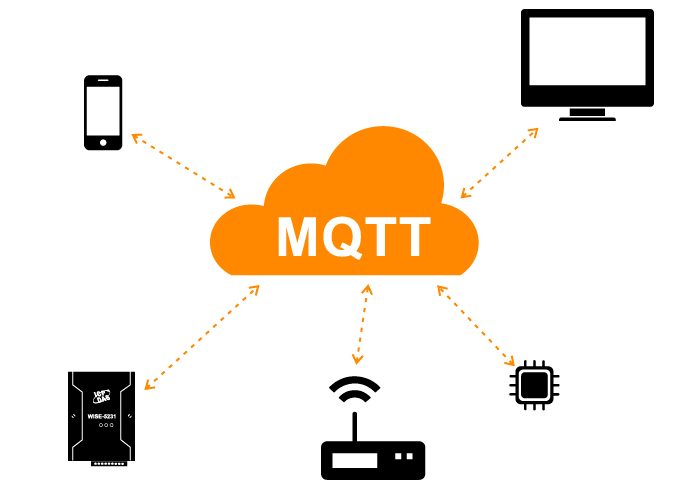
Numa rede deste tipo, os dispositivos interagem entre si através de várias interfaces e protocolos de comunicação. Como estamos a considerar a implementação industrial do conceito de IoT, que deve utilizar equipamento industrial com os seus próprios protocolos e hardware, vamos começar a explorar o conceito IIoT (Industrial Internet of Things).
Para comunicar, os dispositivos podem utilizar vários protocolos industriais. Para este efeito, o MQTT é popular.
O que é o MQTT?
O MQTT ou Message Queuing Telemetry Transport é um protocolo de mensagens leve e aberto utilizado para a transferência de dados em locais remotos onde é necessária uma "pequena pegada de código" ou onde a largura de banda da rede é limitada. Estas vantagens permitem a implementação deste protocolo em sistemas M2M (Machine to Machine) e sistemas IIoT (Industrial Internet of Things).
Existe também uma variante do protocolo MQTT-SN (MQTT for Sensor Networks), anteriormente conhecido como MQTT-S, que foi concebido para utilização com dispositivos sem fios incorporados que não suportam redes TCP/IP, como o ZigBee.
Funções do protocolo MQTT
As principais funções do protocolo MQTT:
Protocolo assíncrono
Mensagens compactas
Funciona quando a ligação da linha de transmissão de dados é instável
Suportar vários níveis de qualidade de serviço (QoS)
Integrar facilmente novos dispositivos
On the application layer, the MQTT protocol works on top of the Protocolo TCP/IP and uses port 1883 by default (port 8883 if connecting over SSL).

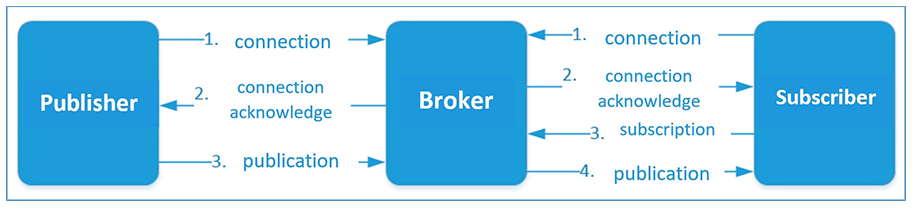
No protocolo MQTT, a troca de mensagens ocorre entre um cliente (que pode ser um editor de mensagens ou um assinante de mensagens) e um corretor de mensagens (como o Mosquitto MQTT).
The publisher sends data on the MQTT Broker with an explicit topic specified in the message. Subscribers can receive various data from multiple publishers based on their subscriptions to the corresponding topics.
Os dispositivos MQTT utilizam determinados tipos de mensagens para comunicar com os corretores. Os principais tipos são os seguintes:
Ligação - Estabelecer uma ligação ao Message Broker
Desconectar - Desconectar do corretor de mensagens
Publicar - publicar dados sobre um tópico no Message Broker
Subscrição - Subscrever um tópico no corretor de mensagens
Cancelar a subscrição - Cancelar a subscrição do tópico
A estrutura da mensagem
As mensagens MQTT contêm as seguintes partes:
Cabeçalho fixo (aparece em todas as mensagens)
Cabeçalhos variáveis (aparecem em algumas mensagens)
Dados, carga útil (presente em algumas mensagens)
1.Fixed head

Message type – eg: CONNECT, SUBSCRIBE, PUBLISH, etc.
Flags unique to each MQTT packet – These 4 bits are used for auxiliary flags, the presence and status of which depends on the message type.
Remaining Length – Current message length (variable header data), size 1 to 4 bytes.
No total, existem 15 tipos de mensagens no protocolo MQTT:
| Message Type | Valor | Direction | Descrição |
|---|---|---|---|
| Reservado | 0000 (0) | Forbidden | Reservado |
| CONNECT | 0001 (1) | C → S | Client request to establish a connection |
| CONNACK | 0010 (2) | S → C | Connection acknowledgment |
| PUBLISH | 0011 (3) | C ↔ S | Publish message |
| PUBACK | 0100 (4) | C ↔ S | Publish acknowledgment |
| PUBREC | 0101 (5) | C ↔ S | Publish received (QoS 2 step 1) |
| PUBREL | 0110 (6) | C ↔ S | Publish release (QoS 2 step 2) |
| PUBCOMP | 0111 (7) | C ↔ S | Publish complete (QoS 2 step 3) |
| SUBSCRIBE | 1000 (8) | C → S | Client subscribe request |
| SUBACK | 1001 (9) | S → C | Subscription acknowledgment |
| UNSUBSCRIBE | 1010 (10) | C → S | Unsubscribe request |
| UNSUBACK | 1011 (11) | S → C | Unsubscribe acknowledgment |
| PINGREQ | 1100 (12) | C → S | Ping request |
| PINGRESP | 1101 (13) | S → C | Ping response |
| DISCONNECT | 1110 (14) | C → S | Client request to disconnect |
| Reservado | 1111 (15) | Forbidden | Reservado |
Os primeiros 4 bits mais significativos do cabeçalho fixo são utilizados como sinalizadores específicos:

DUP – Duplicate is set when a client or MQTT broker submits a retransmitted packet (used in PUBLISH, SUBSCRIBE, UNSUBSCRIBE, PUBREL). If this flag is set, the variable header must contain the message ID (message identifier).
QoS – Quality of Service (0,1,2)
Retention – When data is published with the retention flag, it will be stored by the broker. The broker will send a message with this flag as soon as a new subscription to the topic is established. Only used in PUBISH type messages.
2.Variable Title
Variable headers exist in some headers. It contains the following data:
● Packet identifier – present in all message types except: CONNECT, CONNACK, PUBLISH(сQoS <1), PINGREQ, PINGRESP, DISCONNECT
Nome do protocolo - mostrado apenas no tipo de mensagem CONNECT
Versão do protocolo - só existe no tipo de mensagem CONNECT
sinalizadores de ligação - sinalizadores que especificam o comportamento do cliente durante uma ligação

Username – If this flag is set, a username must be present in the payload (for client authentication)
Password – If this flag is set, the password must be present in the payload (used for client authentication)
Will be retained – If this flag is set to 1, the broker will store a Will message.
Will QoS – Will Message’s quality of service. If the Will flag is set, Will QoS and Will Reservation must be present.
Will flag – If this flag is set, after a client disconnects from the broker without sending a DISCONNECT command (in case of unpredictable shutdown, failure, etc.), the broker will notify all connected clients with a so-called will message.
Clean Session – If this flag is set to 0, the broker stores a session, all client subscriptions will be sent over the client’s next connection, and when the client disconnects, the broker will receive all messages from QoS1 and QoS2. Therefore, if this flag is set to 1, by the next connection, the client must subscribe to all topics again.
Existência da sessão - aplicada em mensagens do tipo CONNACK. Se o Broker aceitar ligações com Clean Session definida para 1, Session Present (SP) deve ser definida para 0. Se o Broker aceitar uma ligação com Clean Session definida para 0, o valor definido no SP depende do facto de o Broker ter armazenado o estado da sessão para este cliente (em caso afirmativo, o SP deve ser definido para 1 e vice-versa). O sinalizador de existência de sessão permite ao cliente determinar se o estado da sessão foi armazenado.
● Connection Return Code – If for some reason the proxy is unable to receive a well-formed CONNACK packet from the client, it must set the appropriate value in the second byte of the CONNACK packet in the following table:
| Valor | Return Code Response | Descrição |
|---|---|---|
| 0 | 0x00 – Connection Accepted | Connection successful |
| 1 | 0x01 – Connection Refused: Unacceptable Protocol Version | Broker does not support the requested protocol version |
| 2 | 0x02 – Connection Refused: Identifier Rejected | Client ID is not valid or not allowed |
| 3 | 0x03 – Connection Refused: Server Unavailable | Broker is unavailable |
| 4 | 0x04 – Connection Refused: Bad Username or Password | Incorrect username or password |
| 5 | 0x05 – Connection Refused: Not Authorized | Client is not authorized to connect |
| 6–255 | Reserved for future use |
The content and format of data transferred via MQTT messages are defined in the device. The data size can be calculated by subtracting the length of the variable header from the remaining length.
3.Data, payload
The payload is the application-level data carried inside an MQTT message. It is included only in specific message types, such as PUBLISH, CONNECT (authentication fields), and Will messages. The MQTT standard does not define a fixed payload structure—the content and format are determined by the device or application.
Depending on the use case, the payload may contain sensor data, JSON objects, binary telemetry, command values, or authentication information such as Username, Password, or Will Message. The payload length is calculated by subtracting the size of the variable header from the Remaining Length field in the fixed header.
Quality of Service in MQTT Protocol (QoS)
MQTT supports three levels of quality of service (QoS) when sending messages.
QoS 0 at most once. At this level, the publisher sends one message at a time to the broker and does not wait for any response, ie send it and forget about it.

QoS 1 at least once. This level ensures that messages are delivered to the broker, but messages can be copied from the publisher. Once the copy is received, the broker sends the message to the Subscriber again and forwards the message receipt acknowledgment to the Publisher . If the publisher does not get a PUBACK message from the broker, it will attempt to re-deliver this packet, setting DUP to 1.

QoS 2 exactly once. At this level, message delivery to the client is guaranteed and duplicate copies are not possible.
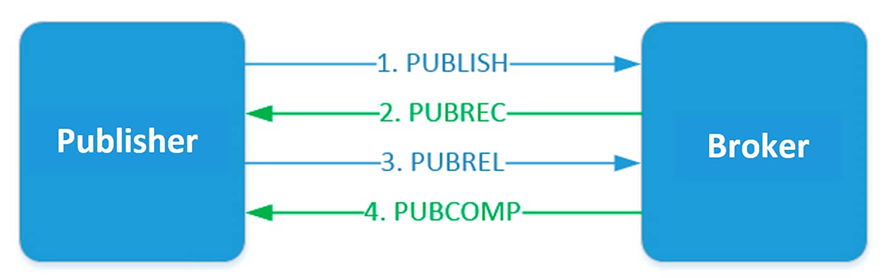
The publisher sends a message to the broker. The message contains a unique packet ID, QoS=2 and DUP=0. The publisher stores unacknowledged messages unless it gets a PUBREC response from the broker. The proxy replies with a PUBREC message containing the same group ID. After receiving this message, the publisher sends a PUBREL with the same packet ID. The broker must store a copy of the message until it obtains a PUBREL. After the broker receives PUBREL, it deletes the message copy and sends a PUBCOMP message about the completed transaction to the publisher.